

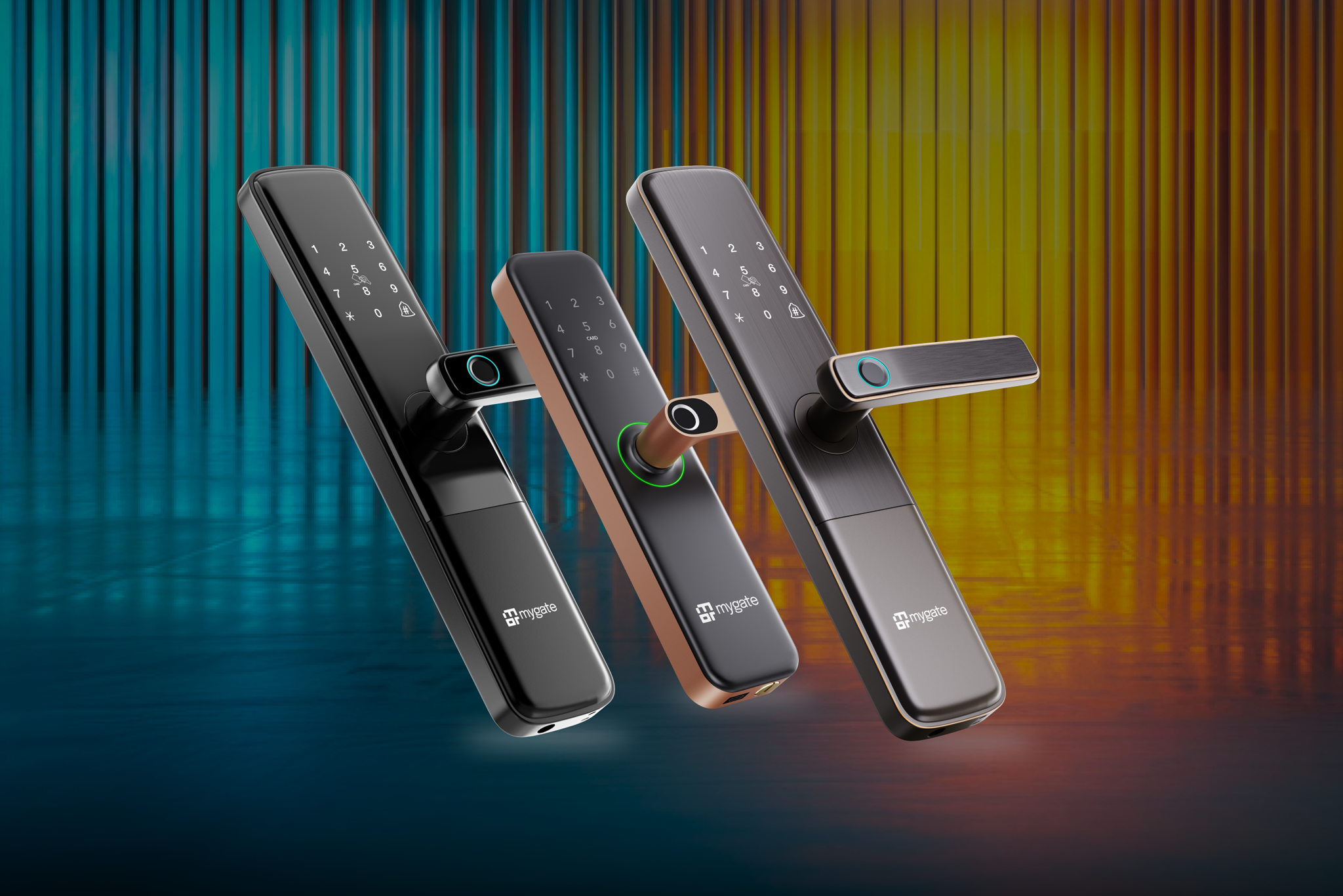
Mygate sells more than one smart lock, and the differences between models are meaningful enough that picking the wrong one can mean either overpaying for features you will not use, or ending up with a lock that does not quite cover what you actually need. The current lineup spans five models, Lock SE, Lock Plus, Lock Pro 2.0, Lock Pro 2.0 Ultra, and Lock Edge, each built for a slightly different door type, budget, or security requirement.
This guide compares them directly, covering what each model actually includes, which door types they support, and which one makes sense depending on your specific situation.
| Model | Positioning | Price | Deadbolts | Door Compatibility | Standout Features |
| Lock SE | Starter | ₹9,950 | 1 | Wooden doors, 30mm–65mm | 6 unlock methods, remote unlock with OTP, timed access |
| Lock Plus | Advanced | ₹13,990 | 3 | Wooden doors, 35mm–65mm | Tamper alert, child lock, auto latching |
| Lock Pro 2.0 | Luxury | ₹29,990 | 3 | Wooden doors, 34mm–65mm | Built-in door sensor, next-gen security system |
| Lock Pro 2.0 Ultra | Ultra Luxury | ₹34,990 | 3 | Wooden doors, 34mm–65mm | Facial recognition, rechargeable lithium battery |
| Lock Edge | Compact / Specialised | ₹9,990 | 1 Latch Bolt | Wooden & metal doors, 25mm–65mm | 6 unlock methods, timed access, designed for slim doors |
Pricing varies by finish and retailer, and it is worth checking Mygate’s official store for current pricing before deciding, since figures listed across third party marketplaces can differ from the official rate.
Lock SE: The starting point
Lock SE is positioned as the entry level option in the lineup, built for buyers who want a reliable, genuinely keyless upgrade over a traditional lock without paying for features they may not need.
It comes with six unlock methods, giving you flexibility between fingerprint, PIN, RFID card, and other access options depending on who is using the door and how, along with remote unlock support through OTP and timed access scheduling. It is fitted with a single deadbolt and is compatible with wooden doors in the 30 to 65 millimetre thickness range, which covers the vast majority of standard residential wooden doors in India.
Lock SE makes the most sense for buyers installing their first smart lock, homes on a tighter budget, or secondary doors within a property, such as a bedroom or a lower traffic entrance, where the more advanced security features of higher models are less critical than on a main entrance.
Lock Plus: Stronger hardware for the main door
Lock Plus builds directly on Lock SE, keeping its core unlock methods while adding hardware and safety features aimed specifically at a home’s primary entrance.
The most notable upgrade is the jump from one deadbolt to three, which meaningfully increases physical resistance against forced entry compared to the single deadbolt configuration in Lock SE. It also adds a tamper alert, notifying you if someone attempts to manipulate or force the lock, a child lock feature to prevent accidental operation, and auto latching, which ensures the door locks itself automatically after closing rather than depending on someone remembering to manually secure it. Door compatibility shifts slightly to a 35 to 65 millimetre range.
Lock Plus is the more sensible choice for a home’s actual main door in most cases, since the additional deadbolts and tamper detection directly address the higher stakes of securing a property’s primary entry point, where Lock SE’s single deadbolt configuration may feel insufficient for some buyers.
Lock Pro 2.0: Broader door support and visibility
Lock Pro 2.0 sits a tier above Lock Plus, carrying forward its deadbolt and safety features while adding two capabilities that meaningfully change what the lock can do and where it can be installed.
The built-in door sensor is the headline addition, letting you check in real time through the app whether your door is actually closed and locked, rather than assuming it is based on the last action taken. This addresses a genuinely common concern, since a door that was unlocked but not fully closed can otherwise go unnoticed. Lock Pro 2.0 also expands supported door types well beyond wooden doors, covering fire doors, glass doors, metal doors, and UPVC doors, in addition to wooden doors, within a 34 to 65 millimetre thickness range. It supports up to 200 registered users, which matters for larger households, properties with significant staff turnover, or situations where many people legitimately need access.
Lock Pro 2.0 is the right tier for buyers whose door is not a standard wooden door, since Lock SE and Lock Plus are built primarily around wooden door installation. It is also a reasonable upgrade for anyone who specifically wants real time door status visibility as a security feature, beyond what tamper alerts alone provide.
Lock Pro 2.0 Ultra: The premium option
Lock Pro 2.0 Ultra sits at the top of the current lineup, carrying forward every feature from Lock Pro 2.0 and adding two further upgrades aimed at buyers who want the most advanced access and power options available.
Facial recognition adds a biometric access method beyond fingerprint, PIN, and card, which some buyers prefer for its speed and convenience, particularly for frequent daily use. The lock also moves to a rechargeable lithium battery rather than standard replaceable batteries, which some users find more convenient for long term maintenance, though it does mean charging rather than swapping batteries when a recharge is needed. Door compatibility stays at wooden doors within the 34 to 65 millimetre range, similar to Lock Pro 2.0.
Lock Pro 2.0 Ultra makes sense for buyers who specifically want facial recognition as an access method and are comfortable with the higher price point that comes with the most feature complete model in the lineup. For buyers on a standard wooden main door who do not specifically need facial recognition, Lock Pro 2.0 covers most of the same practical security ground at a lower price.
Lock Edge: Built for difficult doors
Lock Edge addresses a specific problem the rest of the lineup does not directly solve. Standard smart locks, including Mygate’s other models, are generally built around mortise style installation, which works well for wooden doors but does not always suit metal or glass doors that lack a compatible cutout or structure for that installation type.
Lock Edge is positioned specifically for these harder to fit doors, giving buyers with metal gates, glass entrances, or other non standard door types a way to add a smart lock where the rest of the lineup may not install cleanly. This makes it less of a direct competitor to the other models and more of a targeted solution for a specific installation challenge.
If you have already tried to evaluate Lock SE, Plus, Pro 2.0, or Pro 2.0 Ultra against your door and found that none of them fit due to the door material or structure, Lock Edge is worth checking specifically for that reason, rather than as a general upgrade path from the other models.
How to actually choose between them
Rather than starting with which model has the most features, it helps to work backward from your specific situation.
Start with your door type: If your main door is metal or glass rather than standard wood, Lock Edge is likely the relevant starting point, since the rest of the lineup is built primarily around wooden door installation. If you have a fire door, UPVC door, or need broader door type flexibility, Lock Pro 2.0 or Pro 2.0 Ultra are the models that explicitly support this range.
Consider which door you are actually securing: A main entrance generally justifies the stronger deadbolt configuration and tamper detection found in Lock Plus and above, while a secondary or lower traffic door may be adequately served by Lock SE at a lower cost.
Think about how many people need access: If you are outfitting a large household, a property with regular staff turnover, or a villa with several family members and household help needing individual access, Lock Pro 2.0’s higher registered user capacity is a meaningful practical advantage over the lower tiers.
Decide whether facial recognition specifically matters to you: This is the one feature genuinely unique to Lock Pro 2.0 Ultra. If it is not a priority, Lock Pro 2.0 delivers nearly the same practical security and door compatibility at a lower price.
Set a realistic budget range first: Since pricing varies meaningfully across the lineup, deciding on a budget range before comparing features tends to narrow the decision faster than starting from the full feature list and working down.
A note on the optional accessories
Beyond the locks themselves, Mygate also sells a few accessories worth knowing about when planning a purchase. A WiFi lock gateway extends remote connectivity for locks that rely on it for internet based features. A separate lock door remote supports additional control options for gates or secondary doors. RFID card packs are available separately if you need more cards than what comes standard with your chosen lock, useful for larger households or properties with several regular visitors needing card based access.
These accessories are not required for the locks to function on their own, but are worth factoring into your overall budget if your specific setup calls for them.
FAQs
What is the difference between Mygate Lock SE and Lock Plus?
Lock Plus adds two additional deadbolts over Lock SE’s single deadbolt, along with tamper alert, child lock, and auto latching features, making it better suited for a home’s main entrance, while Lock SE is a lower cost option for secondary doors or first time buyers.
Which Mygate lock supports metal or glass doors?
Lock Pro 2.0 and Lock Pro 2.0 Ultra support fire, glass, metal, and UPVC doors in addition to wooden doors. Lock Edge is specifically built for doors that standard mortise style locks cannot easily fit.
What does the door sensor in Lock Pro 2.0 actually do?
It lets you check in real time through the app whether your door is fully closed and locked, rather than assuming based on the last recorded action, which helps catch situations where a door was unlocked but not properly closed.
Is Lock Pro 2.0 Ultra worth the extra cost over Lock Pro 2.0?
It depends mainly on whether facial recognition and a rechargeable battery specifically matter to you. Both models share the same door sensor and broad door type compatibility, so Pro 2.0 Ultra is primarily an upgrade for buyers who want those two specific additions.
How many people can be registered on a Mygate smart lock?
This varies by model. Lock Pro 2.0 and Pro 2.0 Ultra support up to 200 registered users, which is significantly higher than the entry level models and matters most for larger households or properties with frequent staff turnover.
Which Mygate lock is best for a first time smart lock buyer on a budget?
Lock SE is generally the right starting point for buyers who want a reliable, affordable introduction to smart locks, particularly for a standard wooden door that does not require the additional deadbolts or broader door compatibility of the higher tiers.
Conclusion
Choosing between Mygate’s smart lock models comes down less to which one has the most features and more to matching the model to your actual door type, the specific entrance you are securing, and how many people need regular access. Lock SE covers a solid, affordable starting point for wooden doors. Lock Plus strengthens that for a main entrance with added deadbolts and tamper detection. Lock Pro 2.0 extends compatibility to a much wider range of door types and adds real time door status visibility. Lock Pro 2.0 Ultra adds facial recognition and a rechargeable battery for buyers who want the most complete package available. Lock Edge solves the specific problem of metal and glass doors that the rest of the lineup is not built around. Working backward from your door type and actual security needs, rather than simply picking the most expensive option, is the more reliable way to land on the right model.