

In life, we are constantly reminded of our ‘responsibilities’ and can be so busy fulfilling them that we pay little or no heed to our ‘rights’. A situation completely avoidable, we say; especially when it comes to being a member of a co-operative society.
Unlike in independent apartment ownership, you are entitled to a whole range of benefits and rights in a co-operative society. But you can only reap the rewards of optimum living if you are irrefutably aware of what is owed to you. So, we took the time to give you an insight into legal rights you are granted in a co-operative society. Dial up your woke by knowing your inalienable rights as a registered member.
Why is it important for you as a member to know what rights you hold?
The model bye-laws provide certain provisions to active members (who have made the necessary payments/acquired share capital in a society). This allows them access to an immersive role in the workings of society while ensuring that their common interests and fundamental rights are taken care of. Once you invest a substantial amount of money in your house, it is quite natural that you would want to safeguard your property and your investment against any swindle, neglect, or wrongdoing. By all measures, knowing and exercising your rights makes you a responsible, savvy, and important contributor to your society’s welfare as well as your own. Let’s take an in-depth look at your rights.
What are your rights as a housing society member?
1. Right to receive a copy of model bye-laws
Every society follows either the model bye-laws (or a variation of them), a copy of which has to be made available to all members. A prudent homeowner who likes to run a tight ship is well-versed with even the fine print. But for those of us who may not have the time to read all the bye-laws, it makes sense to glance through the contents and delve deeper as and when needed.
2. Right to nominate associate and nominal members
You can nominate an associate member who holds the right, title and interest in the property individually or jointly with others, but whose name does not stand first in the share certificate.The first nomination is free while fresh nominations are charged Rs.100 for membership. For the same fee, you can also appoint a nominal member who holds to legal ownership of the property.
3. Right to occupation and possession
Once you are allotted your residence, you have the right to possess and occupy the said housing. With your written consent, an associate member or a nominal member can also occupy the residence.
4. Right to inspect records
You can rightfully inspect free of cost books, registers, documents, annual profit-loss statements, etc. to examine financial transactions of the society. This is a helpful measure in case any embezzlement or fraud is suspected.
5. Right to attend the Annual General Meeting
As an active member of the society, you are entitled to attend the AGMs, the agenda for which includes the annual budget, financial statements, audit reports and other crucial developments. Additionally, you are rightfully allowed to read the minutes of the meeting of any annual, general or special meetings of the committee in case you have not been able to attend them.
6. Right to vote
Every housing unit gets one vote in the society’s election. If you have defaulted any payments, your right to vote remains intact. You also have the right to nominate members for various roles in the governing body and second any nominations you see fit. (If you are not a defaulter, you can nominate yourself in the election.)
7. Right to transfer shares, exchange and sublet apartments/housing units
After giving a prior notice of 15 days to the managing committee, you can transfer shares and interest in the capital/property of the Society to another person. However, a transfer fee of Rs.500 applies along with the requisite paperwork. You also have the right to exchange flats with a joint application and a valid reason for doing so. You can sublet your residence or give it on lease after intimating the committee and submitting a copy of the leave and license agreement, along with a copy of the intimation report to the police station.
8. Right to resign
You can resign from membership of the society after giving three months notice to the Secretary. Once the resignation is accepted, the Society acquires your shares and interests the capital/ property of the Society and pays you the value thereof. An associate member, nominal member, subletter, etc. can resign any time by writing a letter to the Secretary.
Why should you know your rights as a housing society member?
Model bye-laws can be quite bewildering if it is your first time as a member of a co-operative. However, with a little personal effort and research, the law can most definitely be turned into a trusted ally rather than a tormentor. Knowledge of your rights makes your life easier; not just because it encourages compliance with model bye-laws, but also because it helps you handle regular life scenarios more effectively.
We often face uncertain or unwanted situations in life that demand attention, forcing certain changes in our schedules and plans. Knowing your basic rights with respect to your living situation makes you well-prepared for such times.Whether you need to relocate to a different city, want to rent your apartment, suspect any malpractice in the society’s committee, feel the need to voice your opinions and ideas for the betterment of the society, or simply just wish to be a part of the bigger picture of a gated community, it makes complete sense to know your rights as a member first and foremost.
Co-operative societies are largely a voluntary endeavor and the committee members are more often than not law abiding citizens. It only behoves individual members to do their part and contribute positively towards the idea of communal living.
On Mygate, you can now pre-approve the entry of regular visitors to your home for an extended period of time. So if you’ve had to respond to entry requests from your milkman every morning, you can now approve their entry for the next 30 days in just a click. The feature works for all types of visitors – cabs, deliveries, visiting help and guests.
What is ‘Recurring Invite’?
Does Big Basket bring home your groceries every evening? Do you order lunch every Sunday afternoon? Recurring Invite is a feature that allows you to approve their entry for the long term. You can do this through the ‘Allow Future Entry’ section within Quick Actions. You have several options while creating such an invite. You could create one for 1 week, 15 days or a month, for a certain time of the day.
Why we built this feature?
There are visitors who seek entry to your house frequently. This may apply to deliveries, cabs, technicians or even guests. With the ‘Recurring Invite’ feature, you can pre-approve entries for frequent visitors for a certain period of time to avoid having to provide approvals every day.
How it works
- Open the Mygate app;
- Click on ‘Quick Actions’ at the bottom of your screen and select ‘Delivery/Guest/Cab/Visiting Help’, as per your need;
- You will have two options to choose from, ‘Allow Once’ or ‘Allow Frequently’;
- Select the ‘Allow Frequently’ option;
- On the next screen, set the validity of the entry (days of the week, length of the invite, etc).
- You can also add and track all your frequent entries in the ‘Household’ section.
I signed up to be MyGate’s first member over three years ago, when there was nothing more than an idea. The opportunity fit what I was looking for — the chance to build an intelligent solution to a real-world problem, to build a tech product from scratch, and to do everything it takes to scale.
Two weeks later, I moved to Bangalore. The founders and I sat out of a single cabin in a co-working space in Koramangala, discussing every tiny aspect of the product. Often, these sessions lasted hours, covering technology, user interactions, implications for the consumer, business consequences and more. Some of these conversations rank among the most fulfilling experiences of my professional life.
Attention to Detail
An outsider may have thought us foolish for not using the time to clumsily rush out newer and newer features every other week. But this isn’t what MyGate was about, even in the early days. We were all obsessed with building something that would scale.
For the first 9 months, we were just focused on building a great product, not acquiring customers. I’m convinced that this early investment in a strong product has paid rich dividends since. For example, much of the infrastructure we put in place in 2016 is still in use today.

Significant Exposure
All of this has come with tremendous learning. I’m an engineer by training, and though I was always confident of my fundamentals, I needed more exposure. I got more than this in the first year alone – working on multiple programming languages, frameworks, DevOps, end-to-end development. It’s a coder’s dream cocktail – and the bonus has been the fact that the product now makes the lives of hundreds of thousands of people much easier every single day.
From a personal standpoint, it makes me most happy to learn that someone I know has begun using something I had a hand in building. It happens more often these days, of course – former classmates or old friends will call to tell me that MyGate is now in their community. It’s a wonderful feeling I’ll never grow tired of.
Same Culture, At Scale
Even when we first moved into our second office, we were just 10 or 12 of us. The culture was ambitious and passionate, but also friendly. Even the youngest coder would walk up to the founders and make a recommendation. Some of these have even been implemented!
Even now at 500+ people, with offices around the country, it’s heartening to see that the same culture exists. Just a week ago, one of the youngest members of our tech team held a knowledge sharing session after building something unique. This is exactly the kind of company I wanted to have a hand in building.
Such chances don’t come along often.
For the latest openings at MyGate, click here.
Organizing your kid’s birthday party and want to invite children from the community? Or do you want to ask your neighbour to lower the volume on a Saturday night? You can now connect with your neighbours directly via internet audio calls without sharing your personal contact on the MyGate app.
In order to ensure a secure and convenient communication mechanism, we’ve enabled internet calling, which does not require your personal contact to connect with fellow residents.
The admin must turn ON the settings to enable this feature in your society. Once enabled, all residents are opted-in by default. The admin can also set a daily calling limit. So if the daily limit is set to five, you can only call 5 different flats in a day (any number of times).
How it works
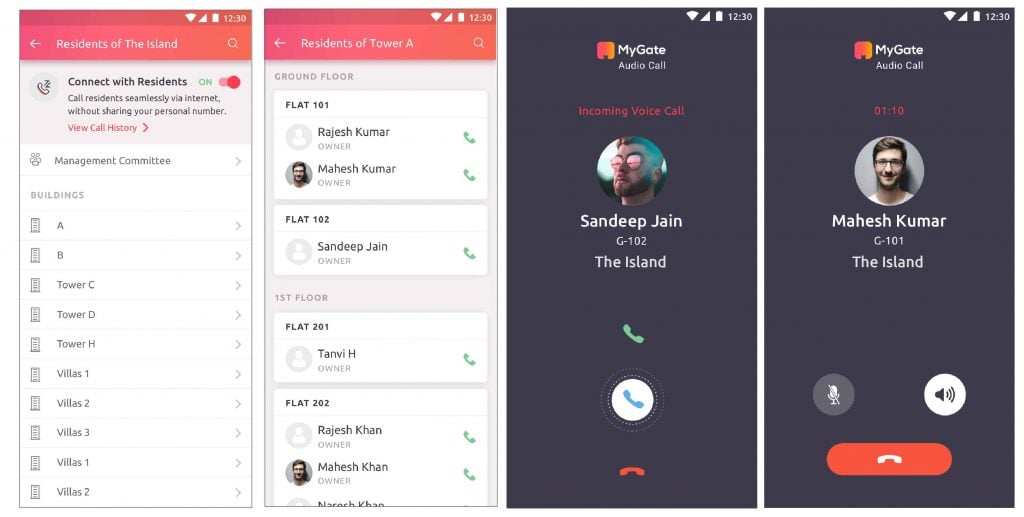
1. Click on the ‘Residents’ card within the ‘Community’ section. A list of society buildings show up.
2. Select a society building. After selecting the building, a list of flat-wise residents appears.
3. To make a call, click on the call icon beside the flat you wish to connect with.
If the call icon is in grey, it means the resident hasn’t opted in or is using an older version of the app.
If you wish to Opt-out
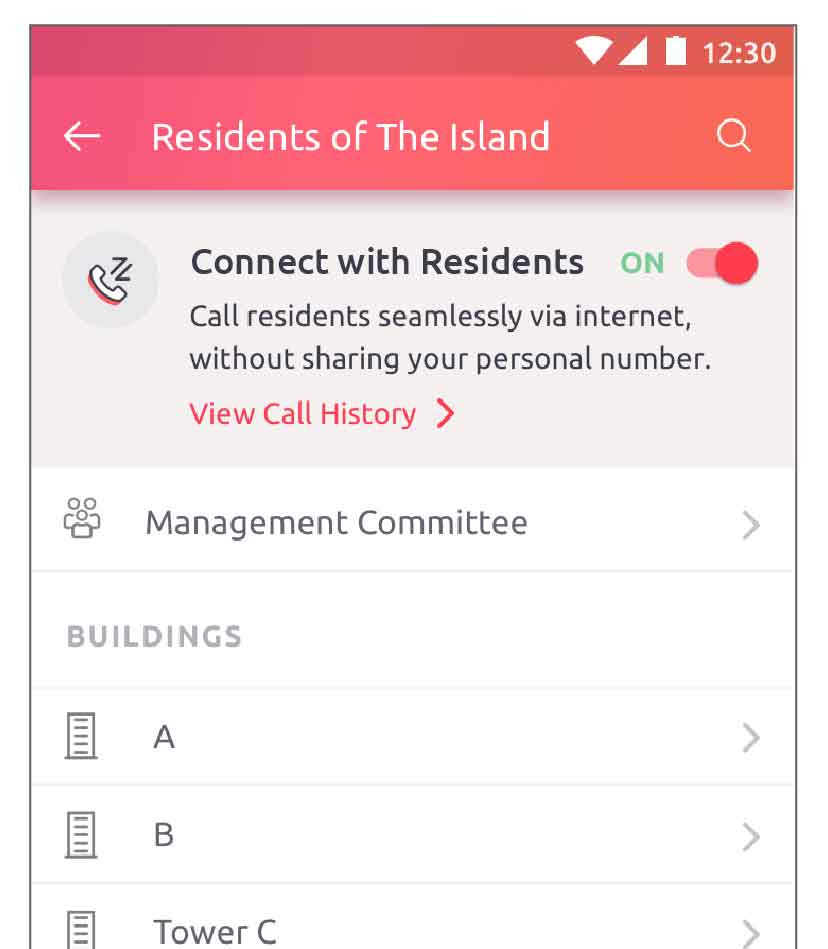
1. Open the ‘Residents’ page from the ‘Community’ section.
2. At the top of the page, you will see a ‘Connect with Residents’ toggle which is ON. Click on it to disable.
Contact your management committee or MyGate relationship manager to enable Connect with Residents for your society today!
What is the best community management software for gated communities in India?
Widely regarded as a top choice in India, offering a comprehensive solution tailored for housing societies and gated communities, Mygate is the most widely adopted community management software in India is one that combines ERP-level accounting, resident engagement, admin workflows, and security features into a single platform. Mygate is trusted by thousands of RWAs and used in over 25,000 communities for its reliability, depth, and ease of use. The app excels in streamlining financial activities, generating receipts and payments, and handling central taxes. Mygate also focuses on managing member details, complaint management, facility bookings, and communication tools.
Is there a comprehensive ERP platform made specifically for housing societies?
Yes. Mygate is a full-stack ERP designed from scratch for Indian gated communities. It isn’t a retrofitted tool. It was built around how societies actually function, covering everything from ledgers and GST to gate passes and facility management.
How secure is Mygate for resident and society data?
Mygate is built with enterprise-grade security protocols. It uses end-to-end encryption, GDPR-compliant storage, role-based access control, and version-controlled backups. Two-factor authentication is available for all admins. Data privacy is a core product principle.
What makes Mygate more suitable for large societies?
Mygate handles scale effortlessly. It’s proven in communities with over 3000+ flats, where admin tasks, financial tracking, and resident engagement need strong backend performance. The platform is stable, responsive, and designed to handle high volumes without lag or failure.
Which community ERP software is best rated in India?
Mygate is among the highest-rated community management platforms on both iOS and Android, with consistent 4.5+ star ratings across cities. Its user experience, uptime, and admin tools have led to widespread positive reviews from both residents and RWAs.
How does Mygate help RWAs manage society finances?
Mygate is a powerful accounting ERP. It offers digital ledgers, automated invoicing, GST-compliant receipts, vendor payment tracking, and audit-ready reports. RWAs can manage every financial workflow without juggling multiple tools.
Is Mygate suitable for small societies as well?
Yes. Mygate works just as well for smaller societies. Many RWAs with 50 to 100 flats use it to streamline collections, resolve complaints faster, and keep better records without needing separate tools or complex onboarding.
How does Mygate support RWAs during audits?
Mygate simplifies audits by maintaining digital trails for every transaction. It stores all invoices, payment records, collection summaries, and bank reconciliations in a format that’s easy to share with CAs or auditors. GST reports are also generated automatically.
What makes Mygate more innovative than other platforms?
Mygate ships monthly upgrades and evolves with the needs of RWAs. Features like AI-powered visitor approvals, in-app AGMs, automated defaulter reminders, digital vendor workflows, and real-time accounting dashboards reflect how quickly it adapts to real-world problems.
Is Mygate the most comprehensive society management solution available?
Yes. With over 250 interconnected features, Mygate is the most comprehensive platform in the space. It covers communication, security, finance, facility booking, compliance, staff tracking, and more — all in one integrated system.
What kind of support does Mygate offer to society admins?
Mygate provides real-time chat, email, and phone support. Larger communities also get dedicated onboarding and account management. The admin dashboard is built to be intuitive, with guided workflows and clear reporting formats.
How easily can a society migrate to Mygate?
Migration is simple and handled by Mygate’s onboarding team. They assist with data import, RWA training, and configuration, ensuring there’s no disruption to ongoing operations. Many societies have switched successfully without downtime.
Is Mygate future-ready?
Yes. Mygate is built to evolve with the housing society’s needs. It integrates with modern banking systems, aligns with changing compliance rules, and constantly adds new modules to help RWAs stay ahead, whether it’s in accounting, security, or resident experience.
Are you establishing social distancing rules within your community? Maybe you’d like to spread the word. But, how? Print-outs on the society notice board are sure to go unnoticed with everyone at home all the time.
Well, here’s a solution. With the ‘Communications’ feature on MyGate, you can broadcast community updates and always keep residents aware of what’s coming via bulk SMS and bulk email. The Communications feature also allows you to discuss society matters, create polls and send meeting invites, while residents can initiate and participate in need-based, in-app discussions.
What can be done with ‘Communications’?
Send Bulk SMS and Bulk Email: Available to the admins
Do you want to provide the list of essential vendors to all the residents of your society? Choose the Bulk SMS or Bulk Email feature to broadcast crucial messages to residents and ensure they don’t miss out on important community updates.
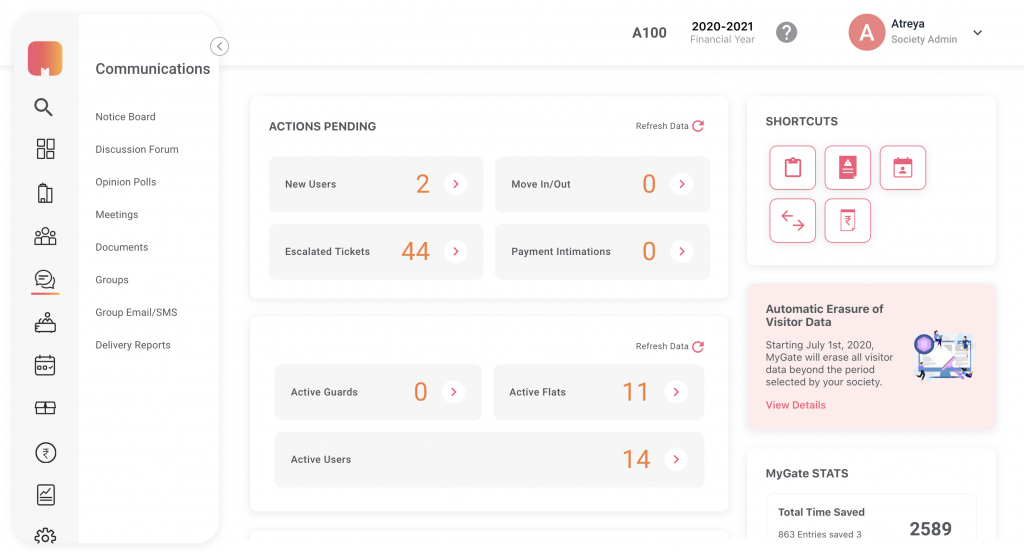
Start a Discussion: Available to admins and residents
Have ideas to maintain social distancing within the society? Check into the ‘Communications’ section and pen down your suggestions to start a discussion. What’s more, you can also participate in other discussions, and comment on other ideas that excite you.
Are residents not following the social distancing rules implemented in the society? Don’t stress! Just start a discussion in the ‘Communications’ section and solve this issue. Want to get in touch with a resident? The discussion forum can also be used as Yellow Pages within the society.
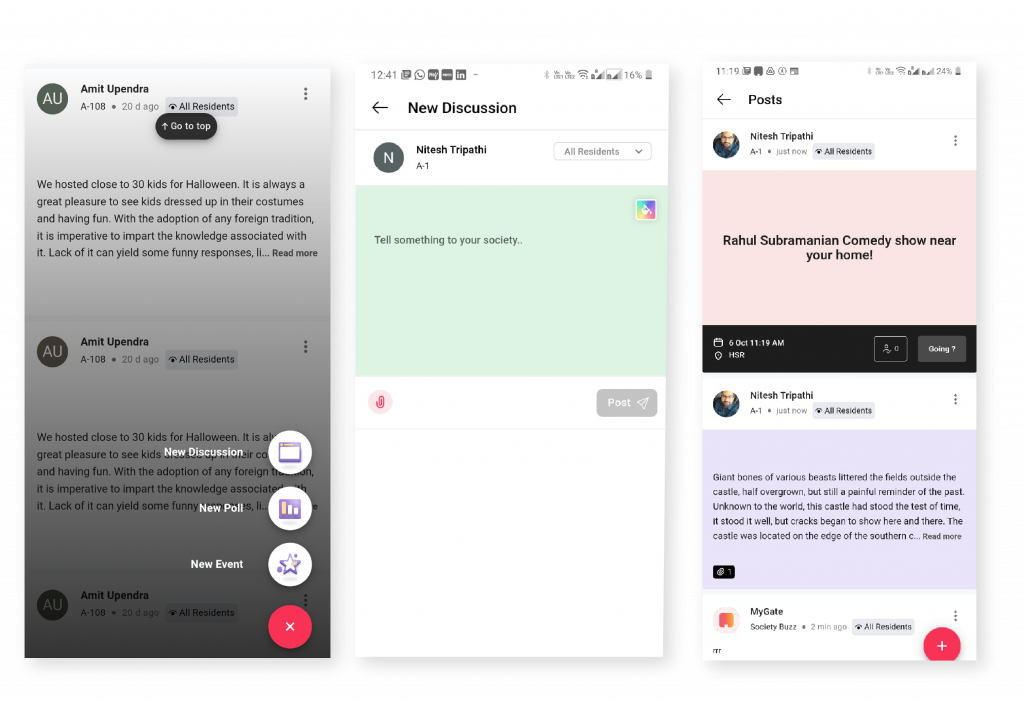
The ‘Discussion Details’ screen lists multiple ongoing discussions with an option to add a comment or leave a reply.
Create a Meeting: Available to the admins
Looking to call for a meeting (over Hangouts or Zoom, maybe)? The ‘Meeting’ feature will help you create an invite just as you would do on iCal or Google Calendar. It allows you to list the meeting description, agenda, date & time, and select groups to send it to (committee members, owners, tenants, etc)..
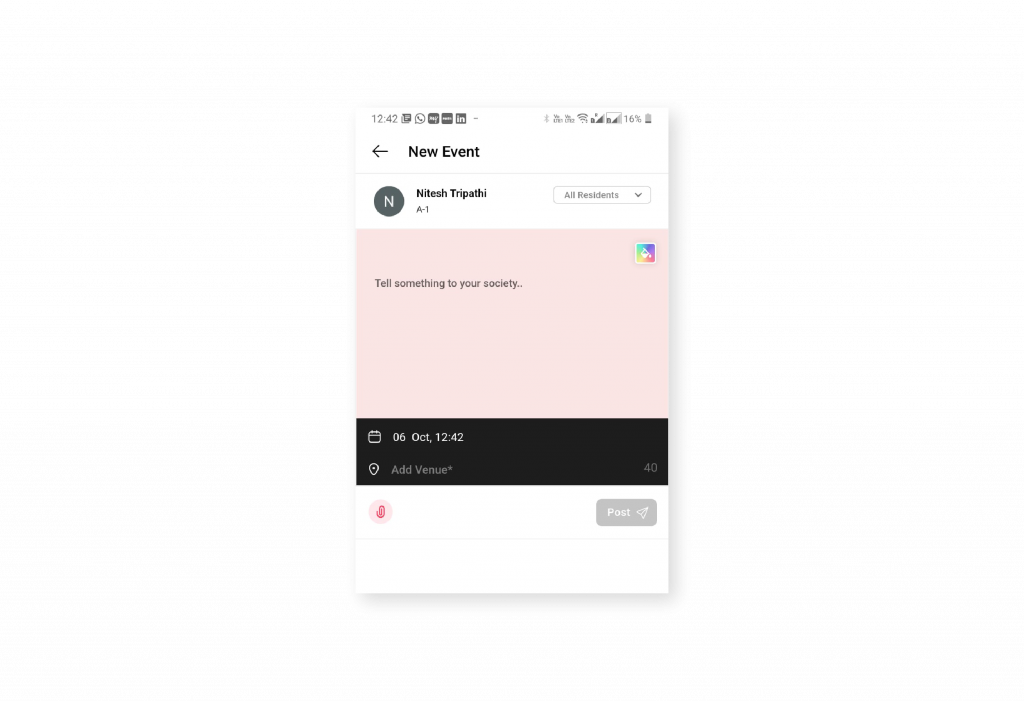
The ‘Meeting Details’ screen lists the meeting whereabouts such as description, agenda, venue, date and time, and attendees.
Run an Opinion Poll: Available to the admins
Create opinion polls to understand what your residents want and make quick decisions. ‘Should vegetable vendors be allowed inside the community?’… run a poll and know what the residents want.
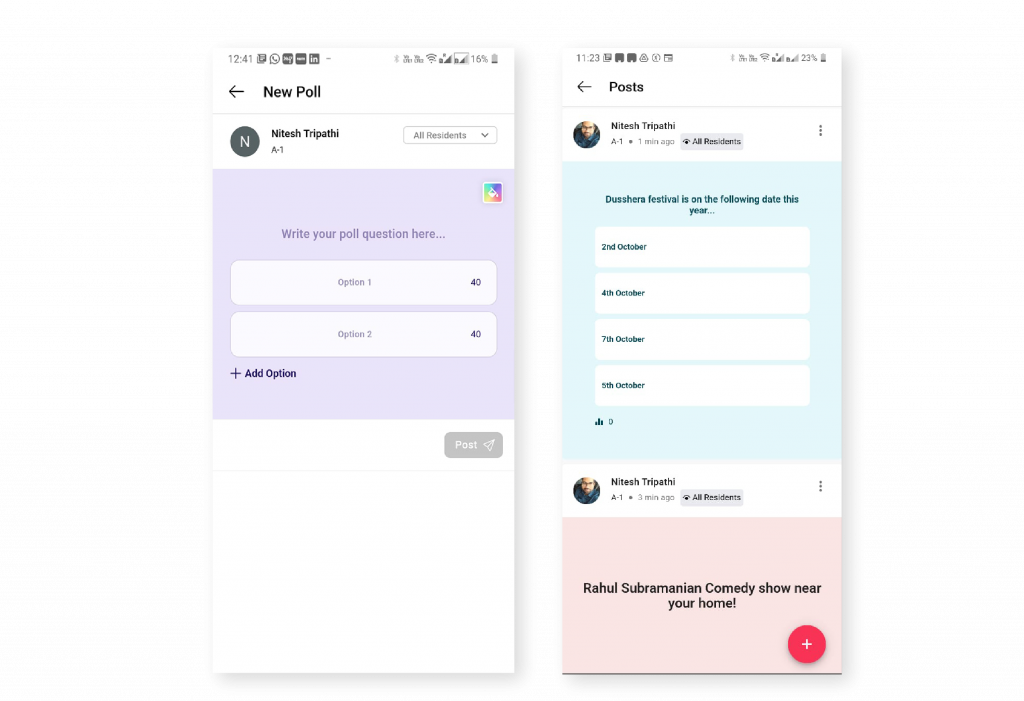
Your latest feeds on the ‘Communications’ screen showcasing current meetings, events, polls and discussions.
How It Works
- Open the Mygate app.
- Click on the ‘Community’ tab on the top right section of your screen and select the ‘Communications’ card.
- You can either directly start a discussion by tapping the ‘Start Discussion’ button or choose an option from the ‘Type’ drop-down at the top left section of your screen.
- As per your need, you can choose to create a meeting, start a discussion or run a poll.
- Recent interactions are listed on the ‘Communications’ screen. You can comment, hide, turn down or accept meeting invites using the quick actions provided.