

Housing societies today collect and manage more personal data than ever before.
From visitor entries and maintenance payments to resident directories and CCTV footage, almost every aspect of community management now involves some form of digital record keeping. While technology has made society operations more efficient, it has also increased the responsibility of RWAs and managing committees to handle personal information carefully.
The Digital Personal Data Protection (DPDP) Act, 2023 introduces a framework that governs how organizations collect, use, store, and protect personal data. Housing societies may not think of themselves as data-driven organizations, but they regularly process information belonging to residents, tenants, visitors, domestic staff, and vendors.
Understanding the DPDP Act is no longer just a legal consideration. It is becoming an important part of responsible community management.
What is the DPDP act?
The Digital Personal Data Protection Act, 2023 is India’s primary law governing the collection and processing of personal data.
The objective of the Act is simple. Individuals should have greater control over their personal information, while organizations should handle that information responsibly and securely.
The Act applies whenever digital personal data is collected, stored, shared, or processed.
For housing societies, this includes resident databases, visitor records, payment information, security logs, communication platforms, and other digital records maintained by the community.
Why does the DPDP act matter for housing societies?
Many RWAs are surprised to learn how much personal information a housing society manages every day.
A typical society may collect:
- Resident names and contact details
- Tenant records
- Vehicle information
- Emergency contact information
- Visitor logs
- Domestic staff details
- CCTV footage
- Maintenance payment records
Because this information belongs to identifiable individuals, it falls within the scope of personal data.
As a result, societies have a responsibility to ensure that data is collected for legitimate purposes, stored securely, and accessed only by authorized individuals.
How does the DPDP act apply to housing societies?
Under the DPDP framework, housing societies and RWAs are generally considered responsible for deciding why and how resident data is collected.
In practical terms:
RWAs and management committees
Responsible for deciding:
- What data is collected
- Why data is collected
- Who can access the data
- How long data is retained
Technology platforms
Society management software providers process information on behalf of the society and help facilitate day-to-day operations.
Residents
Residents remain the owners of their personal information and retain rights regarding how that information is used.
This means committees cannot treat resident information as community property. Personal information must be managed with care and accountability.
Key DPDP principles every housing society should understand
Purpose limitation
Personal data should only be collected for a specific and legitimate purpose.
Examples include:
- Maintenance billing
- Security verification
- Emergency communication
- Visitor management
Information collected for one purpose should not be used for unrelated activities without appropriate permission.
Data minimization
Societies should collect only the information they genuinely require.
For example, a visitor management process may require a visitor’s name and contact number.
Collecting excessive information without a valid reason creates unnecessary privacy risks.
Consent and transparency
Residents should understand:
- What information is being collected
- Why it is being collected
- How it will be used
- Who can access it
Clear communication helps build trust and reduces disputes later.
Data security
Personal information should be protected from unauthorized access, misuse, or accidental disclosure.
This applies to:
- Resident databases
- Visitor records
- Financial information
- CCTV footage
- Staff records
Data retention
Data should not be stored forever.
Societies should periodically review records and remove information that is no longer required for operational or legal purposes.
Common DPDP risks housing societies face
Many privacy issues arise not because of bad intentions but because of outdated practices.
Some common examples include:
Sharing resident directories without permission
Publishing resident names and contact details without consent can create privacy concerns.
Open access to society records
Sensitive information should not be accessible to everyone involved in society administration.
Excessive data collection
Collecting unnecessary resident or visitor information increases risk without improving operations.
Poor handling of visitor data
Visitor logs often contain phone numbers, vehicle details, and entry records that should be protected appropriately.
Uncontrolled sharing on messaging groups
Committee members sometimes share resident information on WhatsApp groups without considering privacy implications.
Practical steps towards DPDP compliance
RWAs do not need to become legal experts overnight to start improving data protection practices. A few practical measures can go a long way in helping housing societies handle resident information more responsibly.
Review the data your society collects. Understand what information is being stored, where it is stored, and who has access to it. This may include resident records, visitor logs, staff details, payment information, and CCTV footage.
Limit access to sensitive information. Personal data should only be accessible to committee members, administrators, or staff who genuinely require it for operational purposes.
Review society vendors and software platforms. Visitor management systems, accounting software, and communication tools often handle large amounts of resident data. Ensure that these service providers follow appropriate privacy and security practices.
Communicate transparently with residents. Residents should know what information is being collected, why it is being collected, and how it is being used by the society.
Establish data retention practices. Information should not be stored indefinitely. Societies should periodically review records and remove data that is no longer required for operational, security, or legal purposes.
Create awareness among committee members and staff. Everyone involved in managing society data should understand the importance of privacy, confidentiality, and responsible data handling.
While DPDP compliance is still evolving, adopting these practices can help housing societies reduce risk, improve transparency, and build greater trust within the community.
Resident rights under the DPDP act
The DPDP Act gives residents more control over how their personal information is used within a housing society. Since societies regularly handle data like contact details, payment records, visitor logs, and identity information, these rights become especially relevant in day-to-day operations.
Right to access information. Residents can ask what personal data the society is holding about them and how it is being used.
Right to correction. If any resident information is incorrect or outdated, residents can request that it be updated so records remain accurate.
Right to withdrawal of consent. Where consent is required for certain types of data use, residents have the right to withdraw it at any time.
Right to erasure. Residents can request deletion of their personal data when it is no longer needed for legitimate society purposes, subject to legal or operational requirements.
Right to grievance redressal. Residents can raise concerns or complaints if they feel their data has been misused or handled improperly.
In simple terms, the DPDP Act ensures that residents are not just passive data subjects. They have visibility and control over how their personal information is managed within the community.
Visitor management, CCTV footage, and DPDP compliance
Visitor records and CCTV footage are among the most sensitive forms of information maintained by housing societies.
Communities should establish clear practices around:
- Collection of visitor information
- Storage of visitor logs
- Access to CCTV footage
- Sharing of security records
- Data retention timelines
Balancing security and privacy is becoming increasingly important for modern residential communities.
How Mygate supports data responsibility under the DPDP act
Mygate helps housing societies manage resident and community data in a more structured and secure way, which aligns with the basic principles of the DPDP Act. Since societies handle sensitive information daily such as visitor entries, maintenance payments, resident details, and staff records, the way this data is stored and accessed becomes important.
Mygate centralises all key society operations on a single platform, reducing the need for spreadsheets, paper registers, or multiple disconnected tools. This helps societies avoid scattered data storage and makes it easier to track who has access to what information.
Access within the platform is role-based, meaning different users such as security staff, committee members, and accountants only see the information relevant to their responsibilities. This reduces unnecessary exposure of personal data.
Visitor management, accounting, communication, and other society functions operate within defined workflows, which helps ensure that data is collected and used only for specific operational purposes like security, billing, or coordination.
The platform also reduces dependency on informal channels like WhatsApp or manual records, where data is harder to control or audit. By keeping records structured and system-driven, societies are better able to maintain consistency in how information is handled.
While compliance responsibilities remain with the RWA, having a unified system like Mygate makes it easier for societies to adopt more disciplined data handling practices in their day-to-day operations.
Bengaluru, 21st October 2026: Mygate, India’s largest community management platform, today announced that AdOnMo, the country’s leading ambient digital advertising platforms focused on gated communities, has merged with it. AdOnMo’s founders Sandeep Bommireddi and Sravanth Gajula will be joining Mygate’s board as co-founders to build and scale the combined company.
By bringing together Mygate’s community platform—trusted by over 6 million households across 30,000 residential communities and AdOnMo’s network of more than 55,000 connected digital screens across 27 cities—the combined company can now not only offer resident welfare associations (RWAs) the best-in-class community management platform but also a passive, non-intrusive way to monetise common areas such as lobbies, gates, clubhouses and elevators.
“Over the past decade, Mygate has built one of India’s most trusted consumer platforms within residential communities, and our job has always been to enhance security & community living, enable resident engagement and streamline processes for the societies we serve,” said Abhishek Kumar, Co-founder & CEO, Mygate. “Coming together with AdOnMo gives us a powerful new way to do that. Communities gain an integrated digital screen infrastructure to communicate critical updates and information effortlessly with residents—all while we continue to uphold the trust and privacy our community residents expect from us.”
“AdOnMo was founded with a vision that ambient advertising could become as intelligent, measurable and technology-driven as digital advertising at scale,” said Sandeep Bommireddi and Sravanth Gajula, Co-founders, AdOnMo. “Joining hands with Mygate allows us to accelerate this vision and create greater value for RWAs, residents, developers and brands alike.”
The merger follows Mygate’s recent ₹225 crore fundraise, led by Dharana Capital in June ’26, one of the largest growth investments in India’s proptech sector this year. The capital is being deployed to strengthen Mygate’s technology platform, accelerate expansion across India and international markets, and pursue strategic opportunities that deepen the value the platform delivers to communities and residents.
In an increasingly connected world, convenience should never come at the cost of personal safety. As residential communities adopt digital solutions to streamline everyday activities, safeguarding resident privacy has become more important than ever.
With this in mind, Mygate introduces Safe Pickup Mode – A thoughtfully designed, privacy-first feature that transforms how cab entries are managed at gated communities.
Rethinking Cab Entry: Why This Feature Matters
For many residents, booking a cab is a routine part of daily life. Yet, a common friction point persists: drivers often request flat numbers to gain entry at the society gate.
While this practice may seem harmless, it raises valid concerns:
- Sharing flat numbers can compromise personal privacy
- It can be uncomfortable, especially for individuals living alone
- Late-night travel scenarios heighten safety risks
In reality, cab pickups rarely require such granular details. Building or tower-level information is typically sufficient for a smooth pickup experience.
Safe Pickup Mode addresses this gap, eliminating unnecessary information sharing while maintaining operational simplicity.
What is Safe Pickup Mode?
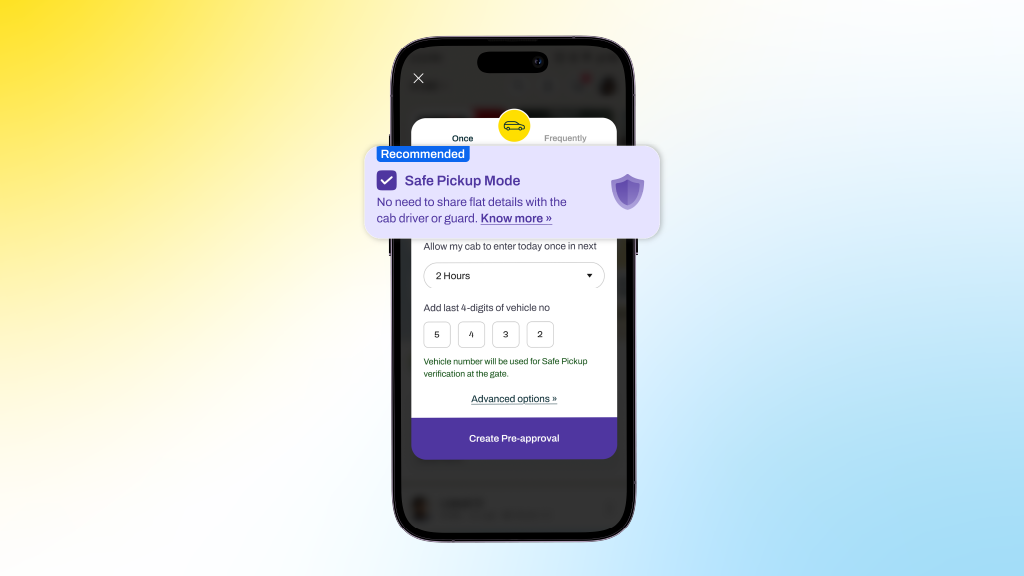
Safe Pickup Mode is a feature within Mygate’s cab pre-approval flow that allows residents to authorize cab entry without revealing their flat number.
Instead, the system uses the vehicle number as the primary identifier for verification at the gate. Guards can validate entry seamlessly, while residents retain control over their personal information.
This approach ensures that privacy is preserved without disrupting the familiar gate entry process.
Key Features at a Glance
1) Private by Design
Residents can hide their flat numbers entirely, ensuring sensitive details are not shared with drivers or displayed unnecessarily.
2) Vehicle-Based Verification
The last four digits of the vehicle number act as the key validation mechanism, leveraging a workflow that is already widely understood and used.
3) Guided User Experience
Clear in-app prompts, confirmations, and a ready-to-share message make it easy for residents to communicate instructions to drivers.
4) Guard-Friendly Interface
Security personnel see only the building or tower name, along with contextual information indicating that the resident has opted for privacy.
How to Use Safe Pickup Mode
Getting started is simple and intuitive:
- Open the Pre-approval section in the Mygate app
- Select Cab → Allow Once
- Enable the Safe Pickup Mode checkbox
- Enter the cab’s vehicle number (mandatory for this mode)
- Share the generated instruction message with your driver
Once completed, your cab will be verified at the gate using the vehicle number, no flat number required.
What Happens at the Gate?
The experience remains smooth and familiar:
- Entry is validated using the vehicle number
- Only the building or tower name is displayed
- Flat numbers are completely hidden
- Contextual cues inform guards that privacy mode is enabled
This ensures that safety protocols remain intact while respecting resident privacy.
Benefits That Matter
1. Enhanced Safety: By limiting the exposure of personal details, residents; especially women, senior citizens, and those living alone can feel more secure.
2. Seamless Experience: There is no disruption to existing workflows. Guards continue using a familiar system, ensuring quick and efficient entry.
3. Greater Control: Residents decide what information is shared, putting privacy firmly in their hands.
A Step Towards Smarter, Safer Communities
Safe Pickup Mode reflects a broader shift in how residential technology should evolve, not just to simplify processes, but to do so responsibly.
By removing the need to share flat-level details, Mygate reinforces an important principle: privacy should be the default, not an afterthought.
Final Thoughts
As urban living continues to grow more dynamic, small design decisions can have a big impact on everyday safety. Safe Pickup Mode is one such step, subtle in execution, but significant in its implications.
It’s not just about getting a cab through the gate.
It’s about ensuring that every resident feels secure while doing so.
Frequently Asked Questions (FAQs)
What is Safe Pickup Mode?
Safe Pickup Mode is a privacy-focused feature that allows residents to pre-approve cab entries using only the vehicle number, without sharing their flat number.
Why should I use Safe Pickup Mode?
It helps protect your privacy by preventing the need to share your flat number with cab drivers, while still ensuring a smooth entry at the gate.
How is the cab verified at the gate?
The guard validates entry using the vehicle number, specifically the last four digits, which act as the key identifier.
Is sharing the vehicle number mandatory?
Yes, entering the vehicle number is required when Safe Pickup Mode is enabled, as it is used for entry verification.
Will this change the process for security guards?
No, the process remains largely the same. Guards continue to verify entries using familiar workflows, now with vehicle number-based validation.
Will the process of sharing my flat number still be available in case I couldn’t provide the vehicle number?
Yes, the existing process remains unchanged. If you’re unable to provide the cab’s vehicle number, you can continue with the regular flow by sharing your flat number for entry verification.
How do I enable Safe Pickup Mode?
While creating a cab pre-approval, simply select the Safe Pickup Mode option and enter the vehicle number.
Is this feature available in all societies?
The feature is controlled by your society admin. It will be available in the app only if your society has enabled it.
Does Safe Pickup Mode affect entry time at the gate?
No, entry remains quick and seamless, as guards use a familiar verification process based on vehicle numbers.
Smart locks have moved from a novelty gadget to a mainstream fixture in Indian homes and apartment complexes over the last few years. Walk through most new residential developments today and you will find fingerprint locks on front doors, app-controlled deadbolts in gated communities, and keypad entries replacing traditional keys altogether. With that shift comes a question almost every homeowner eventually asks before switching over: are these locks actually safe, or are we trading the familiar risk of a lost key for a less familiar risk of a hacked door?
It is a fair question, and the honest answer is that it depends heavily on the specific lock, how it is installed, and how it is used day to day. This guide breaks down how smart locks actually work, what genuine security risks exist, how manufacturers address them, and how to make a sound decision whether you are securing a single apartment door or thinking about smart access at the level of an entire housing society.
How do smart locks actually work?
At a basic level, a smart lock replaces or supplements the mechanical process of turning a key with an electronic authentication step, a PIN code, a fingerprint scan, a smartphone app command, or a physical access card, that then triggers a motor to retract or extend the locking bolt. Most residential smart locks fall into a few broad categories.
Retrofit smart locks attach to an existing deadbolt, essentially automating the turning motion so residents can unlock the door via an app or keypad while the original mechanical lock cylinder remains underneath as a backup.
Full replacement smart locks swap out the entire lock mechanism, offering more integrated features like biometric scanning, built-in keypads, and sometimes video or intercom functionality, but leaving less of the original mechanical backup in place unless specifically designed to include one.
Access control systems, more common in the shared entry points of housing societies, such as the main gate or lobby, typically use RFID cards, QR codes, or app-based credentials tied to a central management system rather than individual door hardware.
Most smart locks communicate over Bluetooth, Wi-Fi, or a mix of both, connecting either directly to a smartphone app in range or through a home hub that also allows remote access when you are away from the property.
What actually makes a lock smart, and where the risk comes from?
The convenience of a smart lock, unlocking your door remotely, granting temporary access to a guest without handing over a physical key, seeing a log of who entered and when, comes from the same feature that introduces new risk: connectivity. A traditional mechanical lock can only be defeated through physical means, picking, bumping, or brute force. A smart lock adds a second attack surface entirely, the software and communication layer, which means its safety depends not just on the quality of its physical hardware but on how well its electronics and app ecosystem are secured.
This is the central tradeoff worth understanding clearly. A well-designed smart lock from a reputable manufacturer, with strong encryption, regular firmware updates, and a properly secured companion app, can be genuinely more secure than a basic mechanical lock, since it eliminates the risk of lock picking or unauthorised key duplication entirely. A poorly designed smart lock, on the other hand, particularly cheap, unbranded devices with weak or outdated security protocols, can introduce vulnerabilities that a simple mechanical lock never had in the first place.
Common concerns about smart lock safety, addressed directly
Can smart locks be hacked remotely?
This is the concern that comes up most often, and it deserves a direct, honest answer. Yes, poorly secured smart locks can theoretically be hacked, particularly if they use outdated Bluetooth protocols, weak encryption, or have known, unpatched software vulnerabilities. However, reputable smart lock manufacturers use strong encryption standards, similar to what protects online banking transactions, and most attacks documented in security research have targeted specific vulnerabilities in particular models or older firmware versions, not smart locks as a category universally.
The practical takeaway is that the manufacturer and model matter enormously here. Established brands that regularly release firmware updates and have undergone independent security audits present a fundamentally lower risk profile than unbranded, budget devices with no clear update history.
What happens if the battery dies?
This is one of the most common practical concerns, and legitimate smart locks are generally designed with this scenario in mind. Most residential smart locks provide low-battery warnings well in advance through the app, and many include a physical key override or an external power port, often a 9-volt battery contact point, that lets you power the lock temporarily to get in even if the internal battery is fully depleted. A smart lock without any backup mechanism for battery failure is a meaningful design weakness worth avoiding when choosing a product.
Can someone bypass a smart lock physically, the same way they might pick a traditional lock?
Smart locks are not immune to physical attack methods. Some models, particularly cheaper ones, have been shown to be vulnerable to techniques like bump keys if they retain a traditional cylinder, or to simple mechanical bypass if the internal motor mechanism is poorly designed. Higher-quality smart locks address this with reinforced bolt mechanisms, anti-pick cylinders where a physical backup exists, and tamper detection that triggers an alert if someone attempts to force the lock.
Is my smart lock at risk if my home Wi-Fi is compromised?
This depends on the lock’s architecture. Locks that rely on Bluetooth for local unlocking and only use Wi-Fi or a hub for remote access features typically have a smaller exposure window, since an attacker would generally need to be in physical proximity to exploit a Bluetooth vulnerability. Locks that are always connected to the internet through Wi-Fi have a theoretically larger attack surface, which is why securing your home network itself, with a strong router password and updated firmware, is part of using a smart lock safely, not a separate concern.
What if someone gets into my smart lock app account?
This is genuinely one of the more significant risk areas, and it is also the one most within a user’s direct control. If your smart lock app account is protected by a weak, reused password, or if you fall for a phishing attempt that captures your login credentials, an attacker does not need to defeat any lock hardware at all, they simply log in and unlock the door remotely. This is why enabling two-factor authentication on the app account, using a strong unique password, and being cautious about phishing attempts matter just as much as the physical lock’s build quality.
What happens during a power outage?
For locks that rely on mains power or a connected hub for full functionality, a power outage can affect remote access features, though most locks are still operable locally via battery power, keypad, or fingerprint scan even without the hub or Wi-Fi active. It is worth confirming this specifically for any lock you are considering, since a lock that becomes fully inoperable during a power cut is a real inconvenience, and potentially a safety issue in an emergency.
Are smart locks safe from a fire safety and emergency egress perspective?
This is an important and sometimes overlooked consideration. In a fire or emergency situation, occupants need to be able to exit quickly without depending on app access, PIN entry under stress, or a functioning battery. Most well-designed residential smart locks allow the door to be opened from the inside with a simple manual turn or push, regardless of the electronic locking state, precisely for this reason. When choosing a smart lock, especially for a primary entry or exit door, confirming that emergency egress does not depend on the electronic system functioning correctly is a genuinely important safety check, not just a security one.
Are smart locks safer than traditional locks overall?
There is no single universal answer, since it depends on the specific comparison being made. Against a poor-quality traditional lock, a well-designed smart lock from a reputable brand is very likely safer, since it removes risks like key duplication by an untrustworthy service provider, lock picking, and the simple problem of lost or stolen physical keys that nobody remembers to account for.
Against a high-quality traditional lock installed correctly, a cheap or poorly secured smart lock can genuinely be a downgrade in security, introducing new digital vulnerabilities without necessarily improving on the physical ones.
The more useful framing is not smart locks versus traditional locks as categories, but rather good security design versus poor security design, which applies within both categories. A thoughtfully chosen smart lock, from a manufacturer with a track record of security updates, paired with sensible digital hygiene like strong passwords and two-factor authentication, tends to outperform most traditional lock setups in practice, particularly around the softer risks like unauthorised key copying that traditional locks handle poorly.
How to choose a genuinely safe smart lock?
Check for recognised security certifications and encryption standards. Reputable manufacturers are usually transparent about the encryption protocols they use and any independent security testing or certification the product has undergone.
Prioritise brands with a track record of firmware updates. A lock that has not received a security update in years, or a manufacturer with no clear update history, is a meaningful red flag regardless of how polished the product looks.
Confirm backup access mechanisms exist. A physical key override, a keypad backup, or an external power option for dead batteries should be non-negotiable features, not optional extras.
Verify emergency egress is not dependent on the electronic system. For any door serving as a primary exit, confirm the door can be opened manually from inside without needing power, an app, or a working battery.
Look for tamper detection and activity logs. A lock that alerts you to repeated failed access attempts or unusual activity gives you visibility a traditional lock simply cannot offer.
Secure the app account properly. Enable two-factor authentication where available, use a strong unique password, and be cautious of phishing attempts targeting your smart home app credentials, since this is often the weakest link regardless of how strong the lock hardware itself is.
Consider local support and service availability. A smart lock is a long-term piece of home infrastructure, and having access to local support for troubleshooting, replacement parts, or warranty service matters more than it might seem at the time of purchase.
Best practices for using smart locks safely, once installed
Keep the lock’s firmware updated whenever the manufacturer releases a new version, since these updates frequently patch newly discovered vulnerabilities. Change default PINs or passwords immediately after installation rather than leaving factory settings in place. Review the lock’s access log periodically, particularly if you share access with multiple people, household help, family members, or guests, to confirm the activity matches what you expect. Revoke temporary or guest access promptly once it is no longer needed, rather than leaving old credentials active indefinitely. And secure your home Wi-Fi network with a strong, unique password, since a smart lock connected to a poorly secured network inherits some of that network’s vulnerability.
Conclusion
Smart locks are not inherently unsafe, but they are also not automatically safer than a traditional lock simply because they are newer or more expensive. The real determining factor is quality of design and implementation, both on the manufacturer’s side, encryption, firmware update discipline, physical build quality, and backup mechanisms, and on the user’s side, strong account security, prompt firmware updates, and sensible access management.
For a single home, this means doing the homework before buying, choosing a reputable brand with a clear security track record, and treating the app account with the same seriousness as any other sensitive login. For a housing society considering smart access at shared entry points, the calculation extends further, since the safety of any individual lock matters less than the strength of the overall access and visitor management process surrounding it. A smart lock is one component of a security system, not the whole system, and treating it that way, backed by proper visitor verification, guard coordination, and real-time visibility into who is entering the property, is what actually keeps a home or a community safe.
Used thoughtfully, with the right product and the right supporting habits, smart locks genuinely can offer better security than the mechanical locks they are replacing. Used carelessly, with a cheap device and a reused password, they can introduce risks a traditional lock never had. The technology itself is not the deciding factor. How it is chosen, installed, and managed is.
Frequently Asked Questions
Can smart locks be hacked easily?
Reputable smart locks with strong encryption and regular firmware updates are difficult to hack remotely, and most documented vulnerabilities have been tied to specific models, weak protocols, or outdated firmware rather than smart locks as a category. Choosing an established brand with a clear security update history significantly reduces this risk.
What happens if a smart lock’s battery runs out while I am not home?
Most quality smart locks provide advanced low-battery warnings through the companion app and include a backup access method, either a physical key override or an external power contact point, so you are not locked out even if the battery fully depletes.
Are smart locks safe to use as a primary entry or exit door in an emergency?
Yes, provided the lock is designed so the door can be opened manually from the inside without depending on power, an app, or battery function, which is a standard safety feature in well-designed residential smart locks and worth confirming before installation.
Is it safer to use a smart lock or a traditional mechanical lock?
It depends more on the specific product and how it is used than on the category itself. A well-designed smart lock from a reputable brand, paired with strong digital security habits, often outperforms a traditional lock, particularly around risks like unauthorised key duplication, while a poorly made smart lock can introduce new vulnerabilities a traditional lock never had.
Do housing societies need to think about smart lock safety differently than individual homeowners?
Yes, because shared entry points affect the entire community’s security, not just one household. For societies, the safety of individual smart locks matters less in isolation than how well they integrate with the broader visitor management, guard verification, and access control processes already in place across the property.
Physical registers used in gated communities are inconsistent, error-prone, and difficult to search, making audits slow and operations unreliable. Guards manually log key handovers, vendor visits, material movements, and other activities in a book, leading to incomplete and illegible records that are hard to track over time. To solve this, we are introducing Digital Registers, admins can create and manage custom registers from the Admin Dashboard, while guards log entries directly from the Guard App. This replaces paper logs with standardised digital entries, real-time visibility, and audit-ready reports.
What you can create
Create custom registers from the admin dashboard for any log related activity, including:
- Key Registers
- Water Tanker Logs
- Material In / Material Out
- Housekeeping supplies
- Clubhouse equipment lent
- Any society-specific operational register
Each register supports 2 to 8 custom fields, allowing you to capture exactly all the information your society needs.
How to create Digital Registers for your society
Most residential societies still rely on paper registers to record key handovers, water tanker entries, clubhouse equipment lent, and material movement. While familiar, these registers are difficult to maintain, prone to errors, and nearly impossible to search when you need an old record.
Digital Registers brings all of these logs into your Mygate Admin Dashboard, making them customizable, searchable, and available in real time for complete operational visibility.
Create a Digital Register in 5 simple steps
Step 1: Log in to your Mygate Admin Dashboard
Login to the dashboard using your admin credentials.
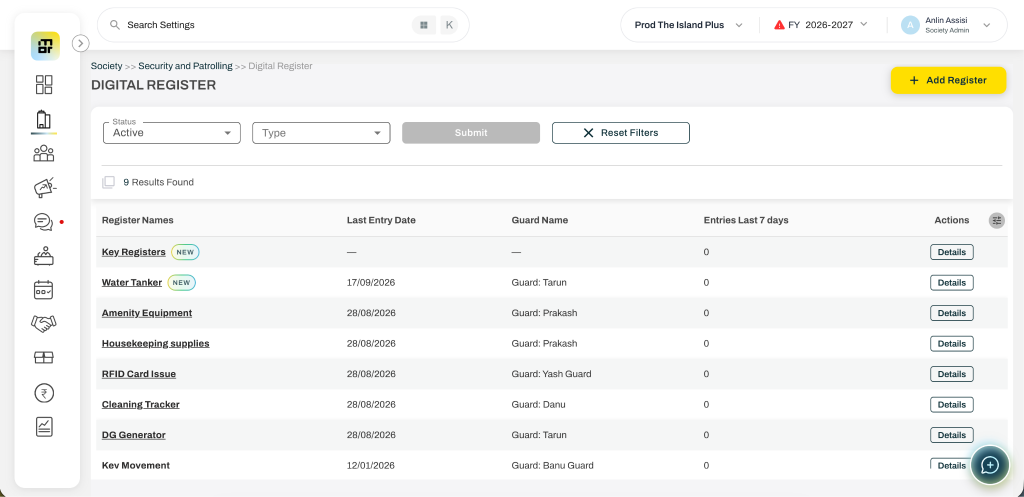
Step 2: Navigate to Digital Registers
Go to Society >> Security and Patrolling >> Digital Register from the left menu. This is where all your society’s gate registers are created and managed.
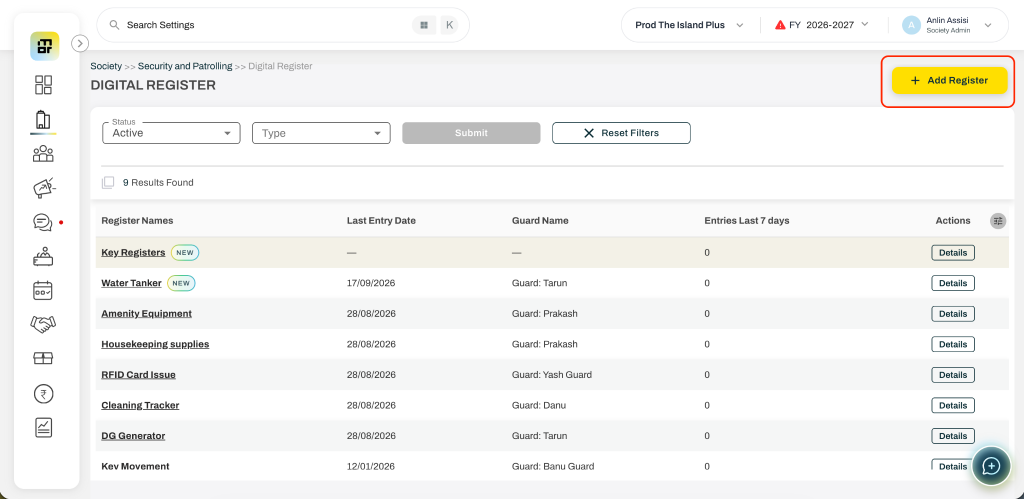
Step 3: Click “Add Register”
Select Add Register and enter a name for your register, such as Key Register, Water Tanker, Material Movement or any other specific register.
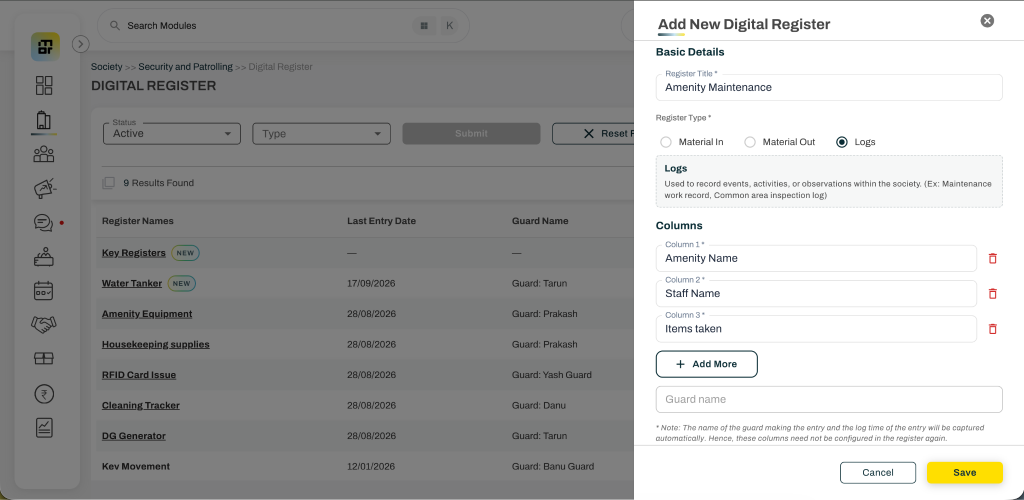
Step 4: Choose the register type and add custom fields
Select the register type –
- Material In – Used for tracking all items and materials entering in
(Ex: Generator Fuel Tanker, Housekeeping supplies, Maintenance equipment delivery) - Material Out – Used for tracking all items and materials leaving/checked out.
(Ex: Amenity/Locker keys issued, Clubhouse equipment lent, Society vehicle dispatched) - Logs – Used to record events, activities, or observations within the society.
(Ex: Maintenance work record, Common area inspection log)
Configure 2 to 8 custom fields based on what your society wants to capture. All the columns added will be mandatory to be filled while entering the records.
Some examples include:
- Key number
- Amenity name
- Staff name
- Purpose of entry
The name of the guard making the entry and the log time of the entry will be captured automatically and visible in the reports. Hence, these columns need not be configured in the register again.
Step 5: Save and start using it
Click Save to create the register. It instantly becomes available in the Guard App, where security guards can begin recording entries digitally. These records will be visible in the admin dashboard and can be filtered based on the dates in real-time.
You may edit the register details and the columns later even if the records have been entered. The admins can also edit the guard entered records once in case of wrong entries made.
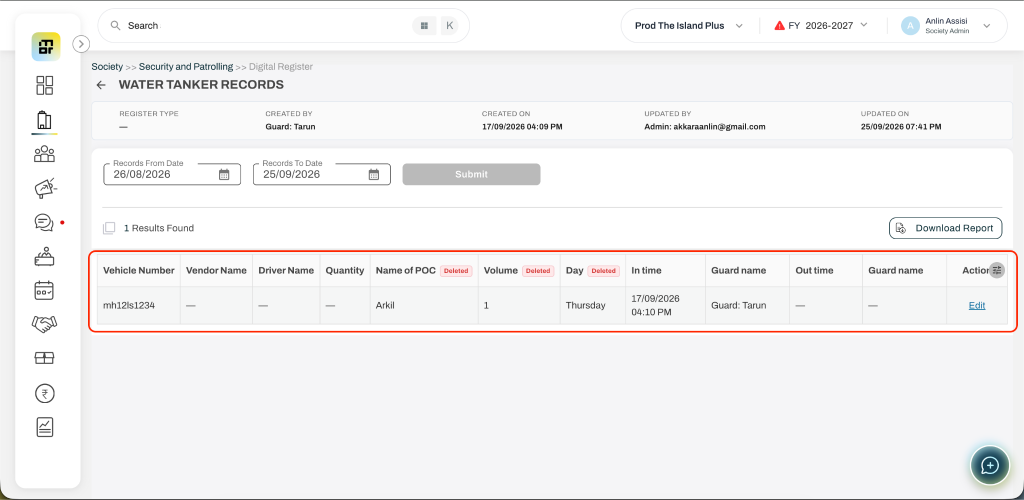
A smarter way to manage gate operations
Digital Registers mark a significant step in modernising operations for gated communities. By moving from paper to digital, societies gain accuracy, accountability, and real-time visibility — while guards benefit from a simpler, guided way to log entries. With admins in control of register creation and customisation, and guards capturing records on the go, this solution scales to the unique needs of any community and lays the foundation for smarter, more automated gate management in the future.
FAQs
What are Digital Registers in Mygate?
Digital Registers allow societies to replace paper-based operational logs with custom digital registers that admins can create and manage from the Mygate Admin Dashboard, while guards record entries through the Guard App.
What types of registers can a society create?
Societies can create registers for activities such as key handovers, water tanker entries, material movement, housekeeping supplies, clubhouse equipment, and other society-specific operational activities.
Can we create a custom Digital Register for our society?
Yes. Admins can create custom registers and choose the fields they want to capture. Each register can have 2 to 8 custom fields.
What types of Digital Registers can admins create?
There are three register types:
- Material In: For tracking items entering the society
- Material Out: For tracking items or materials leaving the society
- Logs: For recording events, activities, or observations within the society
Who can add entries to a Digital Register?
Security guards can record entries directly through the Mygate Guard App once the admin creates and saves the register.
What information is automatically captured in a Digital Register?
The name of the guard making the entry and the time of the entry are captured automatically and are visible in reports, so admins don’t need to create these fields for them.
Can admins view Digital Register entries in real time?
Yes. Records entered by guards are available on the Admin Dashboard and can be filtered by date in real time.
Can admins edit a Digital Register after creating it?
Yes. Admins can edit the register details and its columns even after records have been entered.
Can admins correct a wrong entry made by a guard?
Yes. Admins can edit a guard-entered record once if an incorrect entry has been made.
How does a Digital Register help replace paper registers?
Digital Registers make society records more standardised, searchable and accessible in real time, reducing the challenges associated with incomplete, illegible or difficult-to-track paper records.
Where can admins create Digital Registers in the Mygate Dashboard?
Admins can go to Society → Security and Patrolling → Digital Register from the Mygate Admin Dashboard to create and manage registers.
Are Digital Registers useful for audit and operational tracking?
Yes. Digital Registers provide standardised records, real-time visibility and reports that can help societies maintain more accurate and accountable operational records.
Managing the accounts of a housing society is not simply about recording how much maintenance was collected each month. An RWA also has to keep track of expenses, vendor payments, outstanding dues, bank transactions, reserves, assets and liabilities.
As a society grows, maintaining these records in spreadsheets or basic cash books can become increasingly difficult. This is where double-entry accounting becomes useful.
For an RWA committee or treasurer, understanding the basics of double-entry accounting can make society finances more organised, transparent and easier to audit.
What is double-entry accounting?
Double-entry accounting is a system where every financial transaction is recorded in at least two accounts: a debit and a credit.
The basic principle is:
Every debit has an equal credit.
For example, if a society receives ₹50,000 in maintenance payments into its bank account, the transaction affects both the bank account and the maintenance income or receivable account.
This approach creates a complete financial record rather than simply recording money coming in or going out.
Why is double-entry accounting important for housing societies?
A housing society handles many different types of financial transactions throughout the year. Maintenance collections may come from hundreds of flats, while expenses can include housekeeping, security, electricity, repairs, insurance, statutory payments and vendor bills.
Double-entry accounting helps connect these transactions.
It gives the committee a clearer view of:
- Income and expenditure
- Maintenance collections
- Outstanding dues
- Vendor payments
- Bank balances
- Society assets and liabilities
- Reserve and sinking funds
- Member-wise balances
- Financial statements
It also creates a more structured accounting trail, which can make the records easier to review during the annual audit.
Single-entry vs double-entry accounting for a society
A simple cash-based record might show:
Maintenance received: ₹50,000
Electricity paid: ₹20,000
While this tells you what money moved, it does not provide the complete accounting picture.
Double-entry accounting records the corresponding accounts affected by each transaction.
For example:
| Transaction | Debit | Credit |
| Maintenance received | Bank | Maintenance receivable/income |
| Electricity bill paid | Electricity expense | Bank |
| Vendor payment | Vendor payable | Bank |
| Interest received | Bank | Interest income |
This provides a more complete view of the society’s financial position.
Common double-entry transactions in a housing society
1. Maintenance billing
When maintenance is billed to members, the society needs to record the amount due from members and the corresponding income or receivable.
This allows the committee to distinguish between:
- Amount billed
- Amount collected
- Amount outstanding
That distinction becomes increasingly important in larger societies.
2. Maintenance collection
When a resident pays their outstanding maintenance amount, the payment needs to be reflected against the resident’s outstanding balance and in the society’s bank or cash account.
This helps maintain accurate member-wise records.
3. Vendor payments
Societies regularly work with housekeeping agencies, security providers, electricians, plumbers, lift maintenance companies and other vendors.
When a vendor invoice is recorded and subsequently paid, the accounting system should maintain the connection between the expense, payable and payment.
4. Electricity and utility expenses
Electricity, water and other utilities can represent significant recurring expenses for a society.
Recording these transactions correctly helps the committee understand where society funds are being spent and compare expenditure over time.
5. Sinking and reserve funds
Many societies maintain separate funds for future repairs, replacement and major capital expenditure.
These transactions need to be recorded carefully so that the committee can distinguish between regular operating expenses and amounts set aside for future requirements.
What should society accounting software provide?
Double-entry accounting is only one part of the requirement. A useful society accounting system should also make everyday financial administration easier for the treasurer and committee.
Important capabilities include:
Member-wise accounting
The system should make it easy to see what each flat has been billed, paid and has outstanding.
General ledger
A proper ledger provides a structured record of transactions under different accounts.
Bank reconciliation
Bank transactions should be reconcilable with the society’s accounting records so discrepancies can be identified.
Receivables and outstanding dues
The committee should be able to identify outstanding maintenance and other member dues without manually comparing spreadsheets.
Expense and vendor management
Vendor bills, payments and expenses should be linked to the relevant accounting records.
Financial reports
The system should support the financial reports required by the committee and auditors, rather than simply showing collections and expenses.
Audit trail
Changes to financial records should be traceable, particularly when multiple committee members or administrators have access to the system.
How society management platforms approach accounting?
Accounting is increasingly becoming part of broader society management platforms rather than being handled as a completely separate function.
Platforms such as MaintainEase, ADDA and ApnaComplex offer accounting and billing capabilities alongside other society management functions. NoBrokerHood takes a broader community and security-led approach, while Mygate has expanded from its well-known gate and visitor management capabilities into a comprehensive society management platform.
The important difference for an RWA is not simply whether a platform has an accounting module. It is how deeply accounting is integrated into the rest of the society’s operations.
For example, a committee may want maintenance billing, collections, expenses, vendors, resident records and financial reporting to work together rather than maintaining separate systems for each.
Mygate is particularly relevant for societies looking for this broader ERP approach. Its platform combines accounting and financial management with resident communication, helpdesk, amenities, facility management, vendor management and security operations.
This can be useful for societies that want financial management to sit alongside the rest of their day-to-day society operations rather than operate as a standalone accounting system.
Can society management software replace spreadsheets?
For smaller societies, spreadsheets can initially be sufficient. The problem usually appears as the number of transactions and people involved increases.
A typical society may eventually have:
- Hundreds of maintenance invoices
- Multiple bank accounts
- Numerous vendors
- Recurring utility bills
- Outstanding member dues
- Multiple funds
- Monthly payment records
- Annual audit requirements
At that stage, maintaining everything manually can become time-consuming and increases the possibility of errors.
Moving to dedicated society accounting or management software can provide a central record and reduce repetitive manual work.
What should an RWA check before choosing accounting software?
Before selecting a platform, the committee should ask:
- Does it support proper double-entry accounting?
- Can it maintain member-wise ledgers?
- Can it track outstanding maintenance?
- Can it handle vendor bills and payments?
- Does it support bank reconciliation?
- Can it manage different society funds?
- Are financial reports available for the committee and auditor?
- Is there a proper audit trail?
- Can multiple authorised users access the system?
- Can accounting work alongside other society operations?
The last question is often overlooked.
A society may start by looking for accounting software but eventually realise that accounting is connected to almost every other part of society administration.
Double-entry accounting is about more than debits and credits
For an RWA, the real benefit of double-entry accounting is the financial visibility it creates.
When maintenance billing, collections, expenses, vendor payments, bank transactions and financial reports are connected properly, the committee has a much clearer picture of the society’s finances.
The software should support that process rather than simply digitise the old spreadsheet.
For smaller societies, a focused accounting solution may be enough. For societies with more complex operations, a broader society management ERP can bring accounting, resident services, facilities, communication and security into one system.
The right choice ultimately depends on the society’s size, processes and priorities. But regardless of the platform chosen, maintaining accurate and structured financial records should remain at the centre of good society management.