


Housing societies across India are rapidly evolving, and so are their expectations from digital community platforms. Many RWAs that began their digital journey with Adda are now shifting to Mygate for a more unified, modern, and scalable ERP experience. This shift isn’t just about changing apps; it’s about upgrading to a system that handles billing, payments, accounting, helpdesk, amenities, governance, and resident experience under a single, integrated platform.
Mygate has built a structured 360° migration framework that allows societies to move their data and workflows seamlessly while ensuring continuity, accuracy, and faster adoption. With dedicated experts and strong automation tools, Mygate’s migration ensures that communities don’t lose history; they simply gain efficiency.
What is data migration?
Data migration is the process of securely transferring everything your society has built over the years, from resident data, accounting history, invoices, receipts, helpdesk records, amenities bookings, outstanding balances, and audit trails.
For modern communities, migration has now become a normal part of digital evolution. Societies want platforms that:
- streamline financial workflows
- reduce manual overhead
- improve resident engagement
- support large-scale operations
- strengthen governance and compliance
Mygate ensures the transition is smooth, structured, and protected by strict data accuracy standards.
Why do premium societies migrate from Adda to Mygate?
The shift from Adda to Mygate is motivated by a combination of technology, usability, and operational advantages. Housing societies, especially premium, high-rise, and large gated communities, choose Mygate for its depth, automation, and unified ERP ecosystem.
A more comprehensive ERP ecosystem
Unlike Adda, which has basic accounting and ERP features, Mygate provides a complete, all-in-one robust accounting ERP solution for communities. From deep accounting, robust finance, invoicing, payments, and audits to helpdesk support, amenities management, move-in/move-out processes, staff coordination, and vendor workflows everything is built directly into the Mygate platform. Residents and RWAs no longer have to juggle Excel sheets, manual tracking, or scattered systems, everything they need works seamlessly in one place.
Better adoption through modern design
A major pain point for RWAs is low resident adoption. Mygate solves this with a clean, intuitive interface designed for everyday use. The app is familiar, simple, multilingual, and built for speed, making it easier for residents to pay bills, raise requests, check notices, and stay engaged.
Automation-led accounting
Mygate automates tasks that normally consume hours of manual effort. Invoices are generated on schedule, penalties are applied based on custom rules, GST is computed accurately, ledgers sync automatically, and online payments are reconciled instantly. RWAs migrating from Adda often report a 99.9% reduction in financial errors due to Mygate’s structured automation.
Faster, more accurate migration
Another reason societies prefer Mygate is the platform’s ability to handle large and complex datasets without errors. The system can migrate:
- 6–10+ years of historical accounting
- Lakhs of ledger entries
- Thousands of invoices and receipts
- Entire helpdesk and amenities history
Every value, date, invoice number, and outstanding amount is replicated exactly, ensuring complete audit continuity.
How does Mygate migration work? (step-by-step guide)
Mygate’s migration journey is built on clarity, structure, and expert execution. The process is divided into four stages, each handled by specialists who understand both community operations and accounting standards.
Data discovery & detup
The migration begins with understanding your society’s current digital landscape. Mygate collects:
- Unit master data
- Resident & tenant details
- Past invoices, receipts, and audit reports
- Outstanding dues
- Penalty rules, GST structures
- Helpdesk and amenities configurations
This stage ensures Mygate mirrors your society’s financial and operational reality accurately.
Configuration & data review
Once the data is collected, Mygate configures your ERP environment:
- Billing cycles and structures
- Penalty and interest rules
- Move-in/move-out charges
- Amenities booking rules
- Helpdesk categories and SLAs
- Resident communication channels
The team then reviews the migrated data with the RWA to ensure accuracy and completeness before moving to the next stage.
Service integration & financial setup
This phase focuses on bringing the finer operational details into Mygate:
- Historical payments and outstanding dues
- Year-wise accounting entries
- Amenities and helpdesk histories
- Bank details and payment gateways
- GST and compliance rules
All financial data is structured so that audit trails remain intact and treasurers can start working immediately.
Final validation, training & go-live
Before going live:
- RWAs verify accounting summaries
- Helpdesk and amenities are tested
- Staff and MC members undergo training
- Resident onboarding sessions are conducted
The platform only goes live after the committee confirms everything is accurate and ready.
Mygate’s 360° migration checklist
Mygate follows a clearly defined weekly roadmap to keep the migration predictable and transparent:
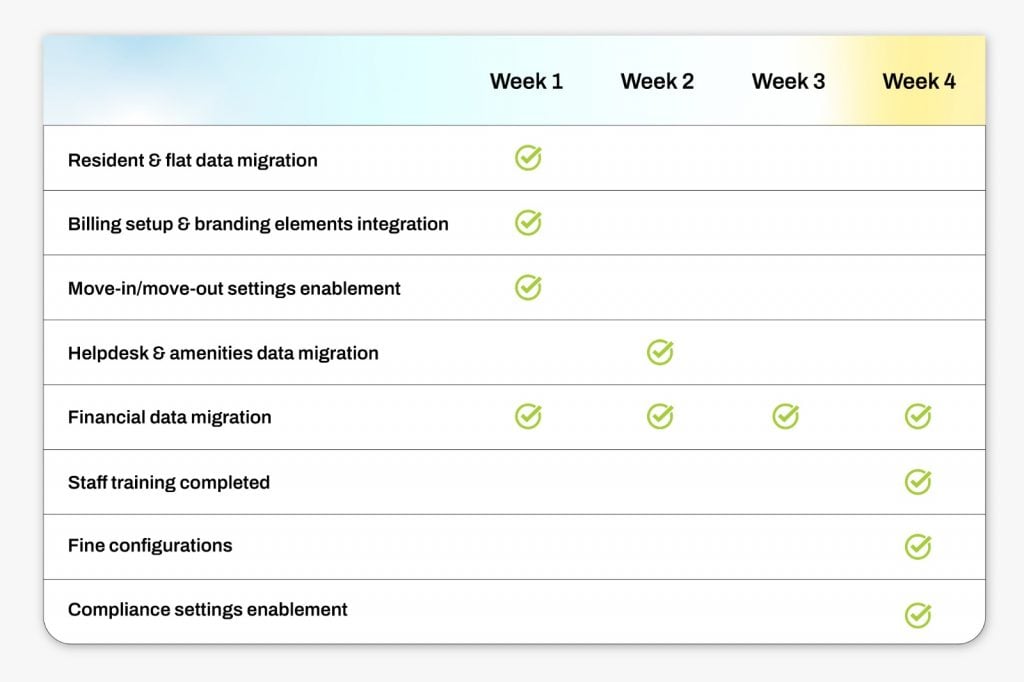
This ensures societies experience zero disruption and full continuity of operations.
What sets Mygate apart?
Transparent migration with expert support
RWAs receive detailed timelines, checklists, and daily progress updates. The onboarding team handles heavy lifting, reducing administrative overhead.
Engineering-led accuracy
With 20+ internal data tools, Mygate can process complex financial histories and multi-year datasets with precision.
Tailored governance workflows
Mygate’s accounting ecosystem is audit-ready, GST-compliant, and designed for treasurers, auditors, and MCs who expect complete clarity.
Resident-centric design
By simplifying everyday tasks like payments, approvals, and service requests, Mygate significantly improves resident participation and satisfaction.
Post-migration benefits for RWAs and residents
Once a society goes live on Mygate, the operational improvements are immediate and measurable. Communities report:
- Faster billing cycles and higher collection rates
- Clear audit trails and simplified financial governance
- Improved response times through a digital helpdesk
- Seamless resident adoption due to intuitive design
- Greater transparency and reduced manual work
- Dedicated ongoing support for management teams
Mygate essentially becomes the operating system for your community.
Migrating from Adda to Mygate isn’t just an upgrade; it’s a shift to a modern, unified, and automation-driven comprehensive all-in-one ERP ecosystem. With a structured migration process, dedicated experts, strong financial tools, and a resident-friendly platform, Mygate offers housing societies a solution that enhances governance, accuracy, and day-to-day convenience.
For RWAs looking to improve transparency, reduce manual workload, and manage large-scale operations smoothly, Mygate delivers a future-ready digital foundation.
FAQs: Migration from Adda to Mygate
What is data migration in housing society software?
Data migration is the process of securely transferring all your society’s information including resident data, accounting history, invoices, receipts, helpdesk records, and amenities bookings from one platform (like Adda) to another (like Mygate) while maintaining accuracy and continuity.
Why are housing societies switching from Adda to Mygate?
Societies migrate to Mygate for a more comprehensive ERP, modern interface, better automation, and integration across billing, accounting, helpdesk, amenities, and resident management all in a single platform.
Will my historical data be lost during migration?
No. Mygate’s structured 360° migration framework ensures that all historical data including years of accounting, invoices, receipts, and helpdesk history is replicated accurately.
How long does the migration process take?
Migration timelines depend on the size and complexity of your society’s data. Typically, Mygate follows a clear weekly roadmap that ensures smooth transition with zero disruption to operations.
Is Mygate migration suitable for large and premium societies?
Yes. Mygate is designed for large, high-rise, and premium gated communities, supporting complex workflows, multi-user management, and automated accounting.
What steps are involved in migrating from Adda to Mygate?
The migration process involves four key stages:
- Data discovery & setup
- Configuration & data review
- Service integration & financial setup
- Final validation, training & go-live
Do residents need training after migration?
Mygate provides resident onboarding sessions along with committee and staff training, ensuring smooth adoption and minimal learning curve.
How does Mygate improve operational efficiency after migration?
Post-migration, societies report faster billing cycles, higher collection rates, clear audit trails, improved helpdesk response times, and increased resident satisfaction due to automation and intuitive design.
Is Mygate migration compliant with audit and GST standards?
Yes. Mygate’s ERP ecosystem is audit-ready, GST-compliant, and structured for complete financial transparency, ensuring smooth compliance for RWAs and auditors.
Can Mygate handle multi-year historical accounting data?
Absolutely. Mygate can migrate 6–10+ years of accounting history, including lakhs of ledger entries, thousands of invoices, and receipts, while preserving audit continuity.