

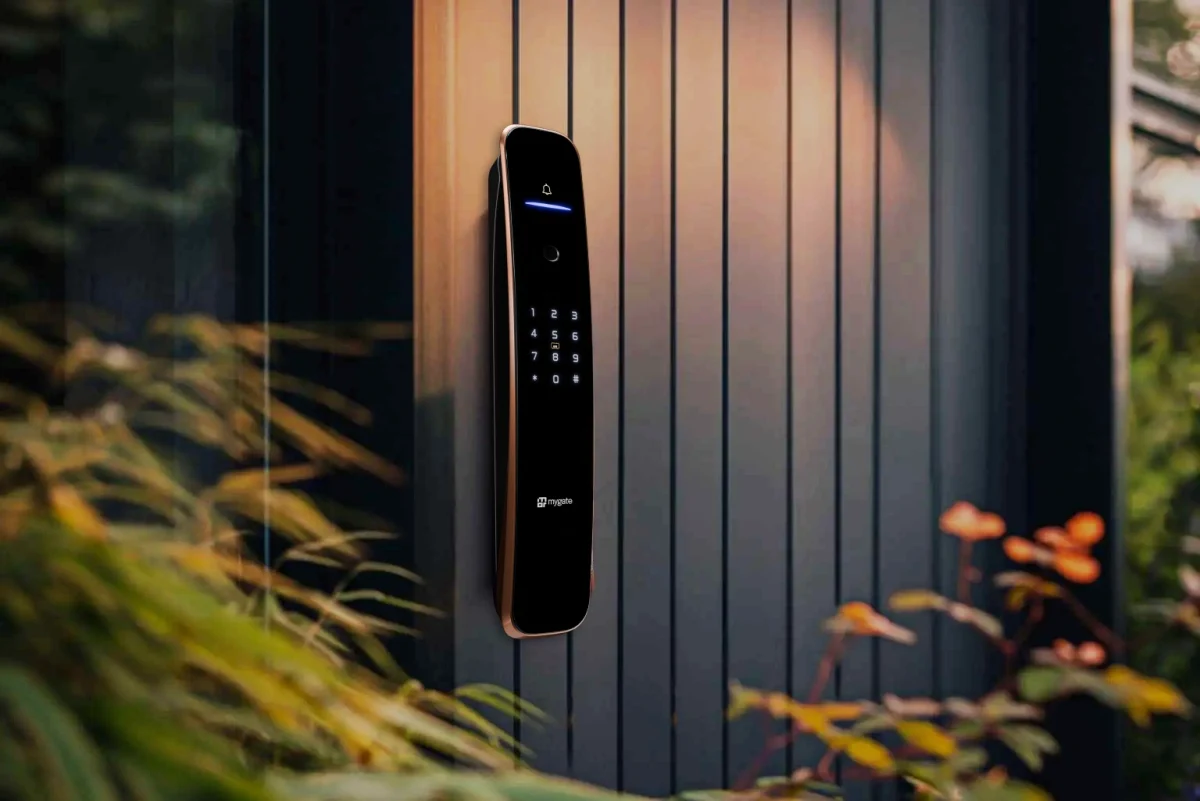
The short answer is no. A Mygate smart lock does not require the Mygate society management app to function day to day, and it does not require you to live in a Mygate managed society either. You can unlock it with a fingerprint, a PIN, an RFID card, or a physical key without opening any app at all. If you do want app based features like remote unlock or activity notifications, that happens through a separate, free app called Mygate Smart Devices, which is open to anyone, whether or not your building uses Mygate for security or society management.
This distinction confuses a lot of buyers, partly because Mygate is a name many people first encounter through gate security or visitor management at their society. In reality, Mygate is a comprehensive society management ERP, with 250 plus features spanning accounting, billing, communication, and security, used by RWA administrators, residents, and security staff across societies of every size. Given that scope, it is reasonable to assume a Mygate smart lock only works if your society has already adopted the full Mygate platform. It does not. This guide breaks down exactly what you need, what you do not, and how the different pieces fit together.
The Short, Direct Answer
You do not need the Mygate society app to install, unlock, or use a Mygate smart lock on a daily basis. Biometric access, PIN codes, RFID cards, and the physical mechanical key backup all work independently of any app.
For remote features such as unlocking your door from outside the house, receiving tamper alerts, or managing access for family members, you use the Mygate Smart Devices app, a separate, dedicated app built specifically for Mygate’s smart hardware. This app is free and available to anyone, regardless of whether they live in a society that uses Mygate’s security platform.
Two Different Mygate Apps, and Why the Distinction Matters
Part of the confusion comes from the fact that Mygate operates two separate apps that serve different purposes.
The main Mygate app is the platform residents, RWA administrators, and security staff use for the full range of society operations, visitor management and gate passes, accounting and maintenance billing, compliance, and communication with the managing committee, all in one configurable system that scales from small residential buildings to large gated townships. This app is tied to a specific society’s account and is relevant once your community has adopted Mygate as its society management platform.
Mygate Smart Devices is a different app entirely, built specifically to control Mygate’s smart home hardware, starting with its smart locks. This app has no dependency on whether your society uses the main Mygate platform. Anyone who buys a Mygate smart lock, whether they live in an independent house, a rented apartment, or a society that has never used Mygate for anything else, can download this app and use it to manage their lock.
If you do happen to live in a Mygate managed society, there is an added convenience. You can also link your smart lock to your existing society app through a manage locks option, so you are not forced to juggle two separate apps if you would rather not.
Ways to Unlock a Mygate Smart Lock Without Any App
A Mygate smart lock is built around multiple independent unlock methods, most of which need no app or even a smartphone nearby.
Fingerprint access lets registered users unlock the door with a fingerprint scan, which works entirely on the lock’s own hardware without any phone involved.
PIN code entry allows a numeric code to be set and shared with household members, so anyone with the code can unlock the door directly at the keypad.
RFID card access works similarly to a hotel key card, letting a resident tap a card against the lock to unlock it.
A physical mechanical key is included as a backup on most models, ensuring the door can always be opened even if the electronic components lose power or malfunction.
OTP based entry allows a one time code to be generated and shared with a guest or service provider for temporary access, useful for situations like letting in a delivery person or a maintenance worker without handing over a permanent code.
None of these methods require the Mygate Smart Devices app to be open, or even installed, at the moment of use. The app becomes relevant when you want to do more than just unlock the door in person.
What the App Actually Adds?
The Mygate Smart Devices app is not required for basic daily use, but it does unlock a meaningful set of additional capabilities that a lock cannot offer entirely on its own.
Remote unlock lets you open your door from anywhere, useful if you need to let in a guest, a relative, or house help while you are not home.
Real time notifications alert you whenever the lock is used, so you know exactly when someone enters or exits, even if you are not physically present.
Recurring timed access lets you set specific hours during which a code or access method works, which is useful for household help who come at the same time each day without needing a permanent, always active code.
Tamper alerts notify you immediately if the lock detects unauthorized attempts to force or manipulate it, adding a layer of proactive security beyond the physical hardware alone.
User management allows you to add or remove access for family members, guests, or staff directly from your phone, rather than needing to physically reprogram the lock each time.
These features genuinely improve the experience of owning a smart lock, but they are optional conveniences layered on top of a lock that already functions independently through biometric, PIN, card, and key access.
Who Can Actually Use a Mygate Smart Lock?
This is where the more important clarification comes in for anyone comparing options. Mygate smart locks are not restricted to residents of societies that already use Mygate’s platform. They are sold and used as standalone smart home hardware, the same way you would buy any other digital door lock. Anyone can buy one, regardless of where or how they live.
Can anyone buy a Mygate smart lock?
Yes. Mygate smart locks are sold openly online and through retail, the same way any consumer smart lock is sold. There is no eligibility check, no requirement to be part of an existing Mygate account, and no need to prove you live in a particular type of property before purchasing. You buy the lock, install it, and set it up through the free Mygate Smart Devices app on your own.
Do you need to live in a Mygate society?
No. This is probably the most common misconception, and it is worth being direct about. Living in a society that already uses Mygate for security or billing is not a requirement. The lock and its companion app work completely independently of whether your community has any relationship with Mygate at all. If your society does use Mygate, you get the added option of linking the lock to your existing society app, but that is a convenience, not a prerequisite.
Can you use it in an independent house?
Yes. Mygate smart locks are commonly installed on the main entrance of independent houses, exactly as you would install any digital door lock. Since there is no society or shared building infrastructure involved, setup happens entirely through the Mygate Smart Devices app, with no additional configuration needed for a community or shared gate.
Does it work in villas?
Yes. Villas are functionally similar to independent houses from the lock’s perspective, whether the villa sits within a gated layout or stands on its own. The lock installs on the main door the same way, and if the villa community happens to use Mygate for broader security management, the same manage locks integration available to apartment residents applies here too.
Can you use it in a standalone apartment building?
Yes. A standalone apartment building that is not part of a large, professionally managed society works just as well, since the lock is installed and controlled at the individual unit level rather than depending on building wide infrastructure. Each resident manages their own lock through their own Mygate Smart Devices account, independent of what the rest of the building does.
Can you install it in an office?
Yes, with one practical consideration. Mygate smart locks are designed primarily for residential doors, and the core access methods, fingerprint, PIN, RFID card, and app based unlock, all apply equally well to an office entrance, particularly a small office, cabin, or single entry point. For larger commercial spaces with many simultaneous users, high traffic multi door access, or integration with existing enterprise access control systems, it is worth checking current model specifications or speaking with Mygate directly, since commercial grade access control needs can differ from typical residential use, particularly around the number of concurrent users and integration with turnstile or biometric attendance systems.
This matters for buyers specifically comparing smart locks, since some competing ecosystems do tie certain features to a specific building management platform or require ongoing subscriptions to unlock basic functionality. A Mygate smart lock’s core access methods work regardless of what platform, if any, your community uses, and regardless of whether you live in a flat, a villa, an independent house, or use it in a small office.
Setting Up a Mygate Smart Lock for the First Time
Getting started does not require any prior Mygate account or society membership. The typical process involves downloading the Mygate Smart Devices app from the App Store or Google Play, creating a free account, and following the in app steps to pair your specific lock model.
Installation itself is generally handled without major changes to your existing door, and professional installation support is commonly included, so most buyers do not need to handle the physical fitting themselves. Once installed, you register your fingerprints, set a PIN, and configure any RFID cards you plan to use, all through the app during initial setup, after which the lock functions independently for daily use.
Battery Backup and What Happens During a Power Cut
A common concern with any electronic lock is what happens if the power goes out or the battery runs low. Mygate smart locks are built with long lasting battery backup specifically to handle this, since power interruptions remain a regular part of daily life in many parts of India.
If the battery does eventually run low, most models provide a low battery warning well in advance, and the mechanical key backup ensures you are never physically locked out even in a worst case scenario where the battery is fully depleted.
Security Features Beyond Basic Access Control
Beyond simply unlocking and locking the door, Mygate smart locks include several features aimed specifically at preventing unauthorized access attempts. Tamper alerts notify you the moment someone attempts to force or manipulate the lock. Intrusion logs keep a record of every unlock attempt, successful or not, giving you a clear activity history if you ever need to review who accessed the door and when.
Some models also include an unauthorized freeze feature, which locks out further PIN attempts after repeated incorrect entries, and a pin decoy option, which allows extra, meaningless digits to be entered before or after the real PIN to prevent someone from determining the correct code by watching keypad wear patterns.
Do You Need the App: A Quick Summary
| What you want to do | Do you need the app? |
|---|---|
| Unlock with fingerprint, PIN, RFID card, or key | No |
| Unlock remotely from outside the house | Yes, via Mygate Smart Devices |
| Get notified when the lock is used | Yes, via Mygate Smart Devices |
| Set up recurring access for household help | Yes, via Mygate Smart Devices |
| Receive tamper alerts | Yes, via Mygate Smart Devices |
| Use the lock if you don’t live in a Mygate society | Yes, fully supported, no society membership needed |
| Install and register the lock initially | Yes, briefly, for setup only |
FAQs
Do I need the Mygate app to use a Mygate smart lock?
No. You do not need the main Mygate society app to use a Mygate smart lock. Daily unlocking works through fingerprint, PIN, RFID card, or a physical key without any app. Optional remote features are available through a separate, free app called Mygate Smart Devices.
Is the Mygate Smart Devices app different from the regular Mygate app?
Yes. The regular Mygate app is the society’s main platform, covering accounting, billing, visitor management, compliance, and communication as part of Mygate’s broader society management ERP. Mygate Smart Devices is a separate app built specifically to control Mygate’s smart home hardware, including its locks, and is available to anyone.
Can I use a Mygate smart lock if my society does not use Mygate?
Mygate smart locks are sold and used as standalone smart home devices. You do not need to live in a Mygate managed society to purchase, install, or use one.
Can I still unlock my door if my phone battery dies or I forget it at home?
Yes. Fingerprint access, PIN codes, and RFID cards all work directly at the lock without needing a phone present, and a physical mechanical key is included as a backup.
What happens if the lock’s own battery runs out?
Most models provide a low battery warning in advance, and a mechanical key backup ensures the door can still be opened even if the lock’s battery is fully depleted.
If I live in a Mygate society, can I still use the same app I already have?
Yes. Residents of Mygate managed societies can link their smart lock to their existing Mygate society app through a manage locks option, in addition to or instead of using the separate Smart Devices app.
Can anyone buy a Mygate smart lock?
Yes. Mygate smart locks are sold openly online and through retail with no eligibility requirement. Anyone can purchase, install, and set one up through the free Mygate Smart Devices app.
Do I need to live in a Mygate society to use a Mygate smart lock?
No. The lock and its app work independently of whether your community uses Mygate for security or society management. It is a standalone product available to anyone.
Can I use a Mygate smart lock in an independent house?
Yes. Mygate smart locks are commonly installed on independent house entrances and set up entirely through the Mygate Smart Devices app, with no society or shared infrastructure required.
Does a Mygate smart lock work in villas?
Yes. Villas are treated the same as independent houses for installation and setup, whether the villa is part of a gated layout or stands on its own.
Can I use a Mygate smart lock in a standalone apartment building?
Yes. Each resident’s lock is managed individually through their own Mygate Smart Devices account, so it works the same way in a standalone building as it does in a larger managed society.
Can I install a Mygate smart lock in my office?
Yes for most small offices or single entry points, since the core fingerprint, PIN, RFID, and app based access methods apply the same way. For larger commercial spaces with many simultaneous users or existing enterprise access systems, it is worth confirming current model specifications first.
Conclusion
A Mygate smart lock is designed to work on its own, with fingerprint, PIN, RFID card, and key access all available without any app. The Mygate Smart Devices app adds genuinely useful features like remote unlock and real time notifications, but it is a separate, free app open to anyone, not a requirement tied to living in a Mygate managed society. Whether you are in an independent home, a rental, or a community that has never used Mygate before, the lock works exactly the same way.