

Every morning, thousands of people step out of the same gated community, get into separate cars, and head in the same direction.
Different apartments. Similar destinations.
It’s a routine that contributes to packed roads, rising fuel costs, and long, tiring commutes. But what if the solution was already living a few floors away?
That’s the idea behind Carpool, Mygate’s newest feature that helps residents discover and coordinate rides with neighbours travelling along similar routes.
A simpler way to commute
Carpooling isn’t a new concept. What’s often missing is convenience.
Finding someone with a similar schedule, a nearby pickup point, and confidence in who you’re travelling with has traditionally been difficult. Within a gated community, those barriers are significantly lower.
With Mygate already connecting over 5 million homes across 27,000+ communities, residents can now find fellow commuters within a trusted network they already use every day.
Why it matters?
Urban commuting continues to become more expensive and time-consuming. More cars on the road mean more traffic, higher fuel consumption, and longer travel times.
By making it easier for neighbours to share rides, Carpool can help:
- Reduce the number of single-occupancy vehicles on the road.
- Lower fuel costs by sharing everyday commutes.
- Make daily travel more efficient and less stressful.
- Support more mindful use of fuel and shared mobility.
Recent government advisories encouraging citizens to reduce fuel consumption and adopt shared mobility further highlight the importance of practical, everyday solutions that people can easily embrace.
More than just getting from A to B
Some of the best conversations happen during a commute.
Whether it’s discovering someone works in the same business district, exchanging ideas with another professional, or simply getting to know a neighbour better, shared rides create opportunities for connections that don’t happen in elevators or WhatsApp groups.
Built around communities
Unlike traditional ride-sharing services, Mygate Carpool starts with a community people already belong to.
Residents are matched within their own society, making it easier to coordinate rides with familiar faces and people who often share similar work schedules and routes.
How to get started with Mygate Carpool
Setting up your ride takes less than a minute.
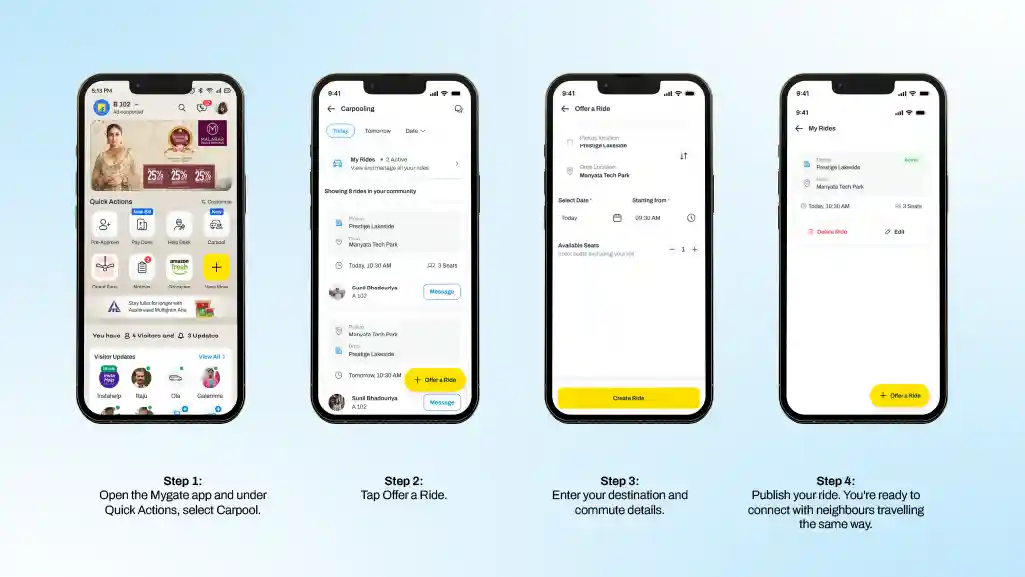
If you’re offering a ride:
- Open the Mygate app and under Quick Actions, select Carpool.
- Tap Offer a Ride.
- Enter your destination and commute details.
- Publish your ride. You’re ready to connect with neighbours travelling the same way.
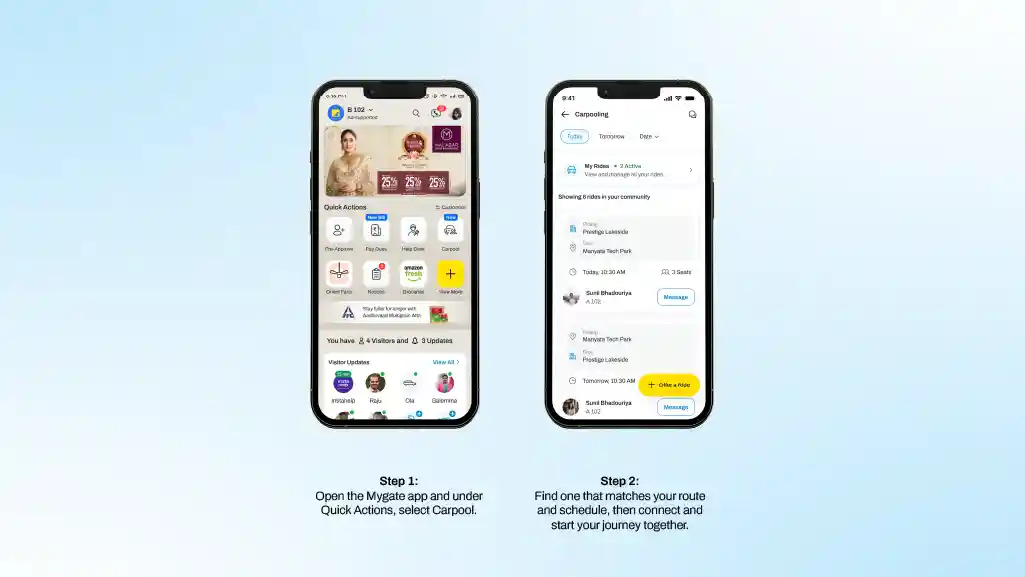
Looking for a ride instead?
Simply head to Quick Actions > Carpool to browse rides shared by residents in your community. Find one that matches your route and schedule, then connect and start your journey together.
Ask most residents what software their housing society uses, and the answer is usually tied to whatever they interact with most visibly, an app for raising security gate passes, or a portal for booking the clubhouse. Ask the treasurer the same question, and you often get a different answer entirely, a separate accounting tool, a billing spreadsheet, and maybe a third system for compliance filings. In many societies, these are not connected at all. They are separate tools that happen to serve the same community.
A society ERP is the answer to that fragmentation. It refers to a single platform that brings together the different operational and financial functions a housing society needs, accounting, billing, collections, compliance, communication, and often security and access management as well, into one connected system rather than a collection of disconnected point solutions. This guide explains what a society ERP actually includes, how it differs from single purpose tools, and what to look for when evaluating one for your community.
Defining society ERP
ERP stands for enterprise resource planning, a term borrowed from corporate software where it refers to systems that integrate core business functions like finance, procurement, and human resources into a single society management platform. Applied to a housing society, a society ERP performs the equivalent role, integrating the functions a managing committee needs to run the community, financial management, operations, compliance, and resident communication, into one connected system rather than requiring separate tools for each.
The key word here is connected. A society could technically use five different apps, one for accounting, one for billing, one for visitor management, one for communication, and one for compliance, and none of those individually would be considered an ERP. What makes a platform a genuine society ERP is that these functions share data and work together, so an invoice generated in the billing module automatically reflects in the accounting module, and a resident’s payment status is visible wherever it is relevant across the system, rather than needing to be manually cross referenced between separate tools.
Core modules of a society ERP
While the exact feature set varies between platforms, most comprehensive Society ERPs cover a similar set of core functions.
Accounting and financial management
This covers the society’s books, including income and expense tracking, bank reconciliation, budget management, and the financial reports committees need for general body meetings and audits. In a connected ERP, society accounting software module draws directly from billing and collection data rather than requiring separate manual entry.
Billing and collections
This includes maintenance invoice generation, support for different billing methods such as equal split or per square foot calculations, online payment collection, automated reminders, and interest or penalty calculation on overdue accounts. This is often the module residents interact with most directly, since it determines how and when they pay.
Compliance and statutory management
Housing societies face recurring compliance obligations, including audit preparation, statutory filings, and record keeping requirements that vary by jurisdiction. A society ERP that handles this within the same system as accounting and billing means compliance reporting draws from data that is already accurate and current, rather than requiring a separate reconciliation effort before every filing deadline.
Communication and resident engagement
This covers announcements, notices, polls, and general communication between the committee and residents. When integrated with billing and compliance, communication becomes more targeted, for example automatically notifying residents with overdue accounts rather than sending generic reminders to the entire community.
Security and access management
This includes visitor management, gate access logs, staff attendance tracking, and in many platforms, integration with physical security infrastructure such as cameras or entry systems. This is often the most visible function to residents day to day, and for some platforms, it has historically been the primary offering.
Helpdesk and complaint management
This allows residents to raise maintenance requests or complaints and allows the committee or facility staff to track resolution, creating a record of recurring issues that can inform longer term maintenance planning.
Amenity and facility booking
For societies with shared facilities such as clubhouses, sports courts, or function halls, this module manages booking schedules and, in some cases, usage based billing tied directly back into the accounting system.
Why connection matters more than feature count?
It is possible to find standalone tools that individually do any one of these functions well, sometimes better than a specific module within a broader ERP. The real value of an ERP is not that each individual function is the best available option, but that they work together without requiring manual effort to keep them consistent.
Consider what happens without this connection. A society using separate tools for billing and accounting needs someone to manually enter collected payments into the accounting system, since the two do not talk to each other. A society using separate tools for billing and communication cannot easily send automated reminders specifically to overdue accounts, since the communication tool has no visibility into billing status. A society using separate tools for compliance and accounting has to manually compile financial data before every audit or statutory filing, rather than pulling directly from records that are already accurate and current.
Each of these gaps represents manual effort, and more importantly, each one is a point where errors and inconsistencies creep in. A connected ERP does not eliminate the need for oversight, but it removes the specific risk that comes from manually keeping disconnected systems in sync.
How does this differ from a security focused platform?
Many societies first adopt technology through a security or access management tool, since visitor management and gate access are often the most immediately visible operational pain point. This is a reasonable starting point, but it addresses only one part of what a society actually needs to manage.
A platform that has grown from security management into a genuine Society ERP typically extends its scope to include financial and compliance functions, not by bolting on unrelated features, but by building billing, accounting, and reporting on the same underlying resident and flat data the security module already maintains. This matters because a resident record, a flat identifier, and an ownership history are relevant to both security access and financial billing, and maintaining this data once, in one place, rather than separately in two disconnected systems, is part of what makes an ERP genuinely more efficient than a collection of point solutions.
Mygate reflects this evolution directly. Earlier it was associated primarily with security and visitor management, now it functions as a comprehensive society management platform that covers deep accounting, billing, collections, compliance tracking, and resident communication within the same platform. For a committee evaluating options, this distinction matters because it changes the actual question being asked. It is not simply which platform has the best gate access features, but which platform can serve as the single operational and financial system the society relies on, without requiring separate tools that need to be manually kept in sync.
Signs a society has outgrown point solutions
A few patterns tend to indicate that a society would benefit from consolidating onto a connected ERP rather than continuing with separate tools for different functions.
If the committee regularly spends time manually transferring data between systems, such as entering collected payments into a separate accounting tool, that manual reconciliation effort is a direct cost of using disconnected point solutions. If compliance and audit preparation requires compiling data from multiple sources rather than pulling from records that are already consistent, that is another clear signal.
If residents receive generic, untargeted communication because the messaging tool has no visibility into their billing or account status, the society is missing the kind of targeted engagement a connected system enables. And if committee handovers are difficult because institutional knowledge about where different records live is scattered across several tools and individuals, rather than centralised in one accessible system, that fragmentation itself is a real operational cost, even if it is not immediately visible on a balance sheet.
Benefits of consolidating on a society ERP
Moving from separate point solutions to a connected ERP delivers a few consistent benefits across societies that make the switch.
Financial visibility improves significantly, since billing, collections, and accounting data live in one place rather than requiring manual reconciliation to get a complete picture. Compliance readiness improves, since audit and statutory filing data is already accurate and current rather than needing to be separately compiled. Resident communication becomes more relevant and targeted, since messaging can draw on actual billing and account status rather than being generic. And committee handovers become smoother, since a new managing committee inherits a single, complete system rather than needing to track down access and institutional knowledge across several disconnected tools.
Perhaps most importantly, a connected ERP reduces the cumulative risk of small errors compounding over time, since data entered once, correctly, propagates consistently across every function that relies on it, rather than needing to be manually kept consistent across separate systems that do not communicate with each other.
What to look for when evaluating a society ERP?
When comparing platforms, a few questions tend to separate genuine ERPs from tools that simply bundle multiple features without real integration between them.
Does billing data automatically reflect in accounting without manual entry? Does compliance reporting draw directly from existing financial records rather than requiring separate compilation? Can communication be targeted based on actual resident account status, such as sending different messages to residents with overdue accounts versus those in good standing? Does the platform maintain a single, consistent resident and flat record used across every function, rather than separate resident databases for security and for billing? And does the platform’s roadmap suggest genuine ongoing investment across all these functions, rather than one area, often security, receiving most of the development attention while other modules lag behind?
Asking for a demonstration that specifically shows data flowing between modules, rather than just viewing each feature in isolation, is often the most direct way to verify whether a platform is a genuine connected ERP or a set of loosely bundled tools marketed together.
Common misconceptions about society ERP
A few misunderstandings come up repeatedly when societies evaluate ERP options.
Some assume that an ERP is only relevant for very large societies with hundreds of units, when in reality, even smaller societies benefit from the reduced manual reconciliation and improved record consistency an ERP provides, simply at a smaller scale of impact. Others assume that adopting an ERP means giving up control over specific processes, such as a customised billing method, when most platforms are actually configurable to match a society’s existing approved billing rules and policies rather than forcing a rigid, one size fits all approach.
There is also a common assumption that a security focused platform and a full ERP are functionally the same thing simply because both are described as society management software. As covered earlier, the meaningful difference lies in whether financial and compliance functions are genuinely integrated with the same resident and operational data, not simply offered as an additional, separate feature.
FAQs
What does ERP stand for in the context of housing societies?
ERP stands for enterprise resource planning, a term describing software that integrates multiple core functions, in this case accounting, billing, compliance, communication, and often security, into a single connected platform rather than separate standalone tools.
How is a Society ERP different from a security management app?
A security management app typically focuses on visitor management and access control. A genuine Society ERP extends beyond this to include accounting, billing, collections, and compliance, all connected to the same underlying resident and operational data.
Is a Society ERP only useful for large communities?
No. While the impact scales with size and complexity, even smaller societies benefit from reduced manual reconciliation, more consistent records, and easier committee handovers that a connected ERP provides.
Can a Society ERP be configured to match a society’s existing billing rules?
Yes, most platforms allow committees to configure their approved billing method, whether equal split, per square foot, or a hybrid model, rather than imposing a fixed, one size fits all structure.
What is the main advantage of using one connected platform instead of separate tools?
The main advantage is that data flows automatically between functions, such as billing feeding directly into accounting and compliance reporting, removing the manual reconciliation effort and error risk that comes from keeping disconnected systems in sync.
How can a committee verify a platform is a genuine ERP and not just bundled features?
Asking for a demonstration that specifically shows data moving between modules, such as an invoice reflecting automatically in accounting and compliance reports, is one of the clearest ways to confirm real integration rather than loosely bundled tools.
Conclusion
A Society ERP is best understood not by any single feature, but by how well its different functions work together as one connected system. Accounting, billing, collections, compliance, communication, and security are all relevant to running a housing society, but their real value comes from sharing consistent data rather than existing as separate tools that require manual effort to keep aligned.
For committees currently managing their society through a patchwork of disconnected apps and spreadsheets, the shift to a genuine ERP is less about adding new features and more about removing the manual reconciliation work and error risk that comes from fragmentation, freeing up time to focus on actually running the community rather than keeping software systems in sync with each other.
A committee can be collecting maintenance diligently every month and still be caught off guard by a cash shortfall, simply because nobody was regularly looking at the right report. Collection reports exist to close exactly this gap. They turn scattered payment data into a clear picture of how well the society is actually collecting what it bills, where the risk is concentrated, and whether trends are improving or getting worse over time.
This guide explains the different types of collection reports a housing society typically relies on, how to read them correctly, which metrics actually matter, and how to use these reports as a decision making tool rather than something generated once and filed away.
Why do collection reports matter more than a bank balance?
A healthy looking bank balance can be misleading. It reflects the society’s current cash position, but it does not show whether that position is stable, whether dues are piling up unnoticed, or whether a handful of large overdue accounts are quietly creating risk that has not yet shown up as a cash problem.
Collection reports matter because they answer a different, more specific question than a bank statement does. They show what portion of billed amounts has actually been collected, which accounts are overdue and for how long, and whether collection performance is trending in the right direction. This is the information a committee actually needs to make decisions about follow up, budgeting, and reserve planning, none of which a simple balance figure can tell you on its own.
The core collection reports every society should use
Collection efficiency report
This report shows the percentage of billed amount that has actually been collected within a given period, typically the current month or financial year. It is calculated by dividing the amount collected by the amount billed, expressed as a percentage.
A society that billed 10,00,000 rupees in a month and collected 9,20,000 rupees has a collection efficiency of 92 percent for that period. Tracking this figure over time, rather than looking at it once, is what reveals whether collection performance is improving, staying steady, or declining, which is far more useful than a single snapshot.
Outstanding dues or ageing report
This report breaks down unpaid amounts by how long they have been outstanding, typically grouped into buckets such as zero to thirty days, thirty one to sixty days, sixty one to ninety days, and beyond ninety days.
This breakdown matters because not all outstanding dues carry the same risk. An account that is fifteen days overdue is a routine, expected part of any billing cycle. An account that has been outstanding for more than ninety days represents a genuinely different kind of risk and typically needs a different response, whether that is a formal notice, a payment plan discussion, or escalation according to the society’s bylaws.
Resident wise dues report
This report lists outstanding amounts by individual flat, making it possible to see at a glance which specific accounts are driving the society’s overall outstanding balance. In most societies, a small number of accounts tend to account for a disproportionate share of total dues, and this report is what makes that concentration visible rather than hidden within an aggregate figure.
Collection trend report
This tracks collection efficiency and total outstanding dues over multiple periods, typically month over month or quarter over quarter, allowing the committee to see whether the society’s overall collection performance is improving or deteriorating over time, rather than judging performance based on any single month in isolation.
Payment method breakdown
This report shows how residents are actually paying, whether through online transfers, cheques, or cash, which helps committees understand where reconciliation effort is being spent and whether encouraging a shift toward online payments would meaningfully reduce administrative work.
How to read an ageing report correctly?
The ageing report deserves particular attention because it is often misread as simply a longer list of who owes money, when its real value lies in the distribution across time buckets, not just the total figure.
A society with 5,00,000 rupees in total outstanding dues, where the vast majority sits in the zero to thirty day bucket, is in a fundamentally different position than a society with the same total outstanding figure where a large portion sits beyond ninety days. The first case likely reflects normal billing cycle timing. The second suggests either a genuine collection problem or specific accounts that need direct intervention.
When reviewing an aging report, the useful question is not simply how much is outstanding, but where that outstanding amount sits across the time buckets, and whether the proportion in the older buckets is growing or shrinking compared to previous periods.
What a healthy collection report looks like?
There is no single universal benchmark, since expectations vary by society size, resident composition, and local context, but a few general patterns tend to indicate healthy collection performance.
Collection efficiency consistently above roughly 90 to 95 percent generally suggests the society is managing collections well, though this should be interpreted alongside the trend rather than as an isolated figure. A relatively small and stable proportion of dues sitting in the older ageing buckets, rather than a growing accumulation there, suggests that overdue accounts are being followed up effectively rather than left unresolved. And a collection trend that holds steady or improves over consecutive periods indicates the society’s processes are working, whereas a gradual decline across several months is worth investigating before it becomes a larger problem.
Warning signs to watch for
A few patterns in collection reports typically warrant closer attention from the committee.
A steadily declining collection efficiency percentage over several consecutive months, rather than a one time dip, often signals a process issue, whether that is inconsistent billing, weak follow up, or a broader resident dissatisfaction that is showing up as delayed payment. A growing concentration of dues in the ninety plus day bucket suggests accounts that have moved beyond routine delay and may need direct intervention or a more formal recovery process.
A small number of accounts accounting for a disproportionately large share of total outstanding dues is not necessarily alarming on its own, but it does mean the committee’s collection strategy should focus specifically on those accounts rather than treating the issue as a broad, society wide problem when it may actually be concentrated in just a handful of cases.
Using collection reports for decision making
Collection reports are most useful when they actively inform specific committee decisions rather than being reviewed passively.
Aging reports should directly inform follow up prioritisation, with accounts in the oldest buckets receiving more direct attention, such as a phone call or formal notice, rather than a generic reminder identical to what a fifteen day overdue account receives. Collection efficiency trends should feed into budget planning, since a society consistently collecting below its billed amount cannot realistically plan expenses as if full collection is guaranteed.
Resident wise dues data should inform whether a payment plan or structured resolution makes sense for specific long overdue accounts, rather than only relying on escalating penalties, which do not always resolve a genuine payment difficulty. And collection trend reports, reviewed regularly, should prompt the committee to investigate the cause of any sustained decline before it becomes severe enough to affect the society’s ability to meet its own obligations.
How often should collection reports be reviewed?
Monthly review is generally the right cadence for most societies, since it keeps the committee close to actual collection activity and allows issues to be caught within a single billing cycle rather than discovered several months later. Aging and resident wise reports specifically benefit from monthly review, since overdue accounts that are addressed early are typically far easier to resolve than accounts that have been allowed to age for several months without any follow up.
Trend reports covering longer periods, such as quarter over quarter comparisons, are useful for a broader strategic view during committee planning or before the annual general body meeting, where residents will reasonably expect a clear account of the society’s collection performance over the past year.
Presenting collection data to residents
Collection reports are not only an internal committee tool. Sharing a summarised version with residents, particularly at the annual general body meeting, builds trust and reinforces the importance of timely payment across the community.
This does not mean sharing individual resident data publicly, which raises legitimate privacy concerns, but rather presenting aggregate figures such as overall collection efficiency, total outstanding dues, and how these have trended over the year. Residents who see that collection performance is tracked transparently, and that overdue accounts are followed up consistently, are generally more likely to prioritise timely payment themselves, since it signals the society takes its financial management seriously.
Why does manual report compilation fall short?
Generating these reports manually, particularly ageing and resident wise breakdowns, requires pulling together billing data, payment records, and due dates, then correctly bucketing each outstanding amount by how long it has actually been overdue. Done manually, this is time consuming even for a small society, and the risk of small errors, such as an account being placed in the wrong ageing bucket, increases significantly as the number of flats grows.
This is exactly the kind of structured, data driven output that benefits from being generated automatically from live billing and payment records rather than manually compiled each time the committee wants to review performance. Mygate generates these reports as part of its comprehensive society management ERP, drawing directly from billing and payment data already in the system, so collection efficiency, ageing breakdowns, and resident wise dues are always current rather than requiring a separate compilation effort before every committee meeting.
FAQs
What is a good collection efficiency percentage for a housing society?
Collection efficiency consistently above roughly 90 to 95 percent generally indicates healthy performance, though this should be viewed alongside the trend over multiple periods rather than a single month in isolation.
What is an ageing report in the context of maintenance collections?
An aging report breaks down outstanding dues by how long they have remained unpaid, typically grouped into buckets such as zero to thirty days, thirty one to sixty days, and beyond ninety days, helping committees prioritize follow up.
How often should collection reports be reviewed?
Monthly review is generally recommended for ageing and resident wise reports, while trend reports covering longer periods are useful for quarterly or annual strategic review.
What does it mean if dues are concentrated in the ninety plus day bucket?
It typically indicates accounts that have moved beyond routine delay and may require more direct intervention, such as a formal notice or a structured payment plan, rather than a standard reminder.
Can collection reports be generated automatically?
Yes. Society management software can generate collection efficiency, ageing, and resident wise reports automatically from live billing and payment data, removing the need for manual compilation.
Conclusion
Collection reports turn scattered payment activity into a clear, actionable picture of a society’s financial health, but only if they are reviewed regularly and used to inform actual decisions rather than generated and set aside. Understanding what each report shows, from overall collection efficiency to the specific risk concentrated in ageing dues, gives committees the ability to act early rather than reacting after a cash flow problem has already emerged.
Societies that build a habit of reviewing these reports consistently tend to catch collection issues while they are still manageable, which is ultimately what separates proactive financial management from a committee that is always one step behind its own numbers.
Ask a committee how much a specific resident paid six months ago, or whether a particular invoice was ever actually sent, and in many societies the honest answer is that nobody is entirely sure without digging through old emails, printed registers, or a spreadsheet that may or may not be up to date. This is not usually a sign of a poorly run society. It is simply what happens when invoice management is treated as a byproduct of billing rather than a discipline in its own right.
Invoice management covers how a society creates, formats, numbers, stores, retrieves, and eventually archives every invoice it issues, along with how it handles corrections, duplicates, and disputes tied to those documents. This guide covers what good invoice management actually looks like, the different types of invoices a society typically deals with, and the common failure points that cause confusion during audits, handovers, and resident disputes.
Why invoice management is different from billing
Billing is about calculating what a resident owes. Invoice management is about the document itself, its format, its record, and its lifecycle from creation to archival. A society can have a perfectly accurate billing calculation and still have poor invoice management if invoices are inconsistently formatted, difficult to retrieve, or not properly numbered and tracked.
This distinction matters because the two problems have different symptoms. Billing errors show up as residents disputing the amount they owe. Invoice management errors show up as residents or auditors being unable to locate, verify, or make sense of a document that should exist and be easily retrievable.
Types of invoices a society typically issues
Most societies deal with more than one category of invoice, and treating them all the same often causes confusion, particularly when residents try to reconcile their own records against what the society has issued.
Regular maintenance invoices are the recurring monthly or quarterly bills covering routine operating expenses, issued on a fixed schedule to every flat.
Sinking fund invoices cover contributions toward major future repairs and are sometimes issued as a separate line item or a distinct invoice, depending on how the society structures its records, since these funds should be tracked separately from operating expenses.
One time levy invoices cover specific, non recurring charges, such as a special collection for an unplanned repair or an infrastructure upgrade, and these need clear documentation of what general body resolution authorised them.
Parking, amenity, or usage based invoices cover charges tied to specific facilities or services used by some residents but not others, such as additional parking slots or clubhouse membership.
Penalty and interest invoices cover late payment charges, and these should ideally reference the original overdue invoice they relate to, rather than appearing as an unexplained standalone charge.
Credit notes and adjustments are issued when a previous invoice needs to be corrected, whether due to a calculation error, a resident dispute that was resolved in the resident’s favour, or a duplicate charge that needs to be reversed.
Keeping these categories distinct in the society’s records, rather than lumping everything into a single undifferentiated ledger entry, makes both resident communication and audit preparation significantly easier.
What a well structured invoice should include
A clear, complete invoice reduces disputes simply by making the charge self explanatory. At minimum, a maintenance invoice should include the invoice number, the billing period it covers, the flat or unit identifier, an itemised breakdown of charges rather than a single combined figure, the due date, any applicable GST details if the society is liable for it, and a clear reference if the invoice relates to a penalty or correction on a previous bill.
The itemised breakdown matters more than it might seem. A resident who sees a single number labelled maintenance is far more likely to question it than a resident who sees that number broken into base maintenance, sinking fund contribution, and any applicable parking or amenity charge. Transparency at the invoice level is one of the simplest ways to reduce the volume of billing related queries a committee has to handle.
Invoice numbering and referencing
A consistent invoice numbering system is one of the more overlooked aspects of invoice management, yet it is essential for locating a specific document later, whether for a resident query, an audit, or a committee handover.
A practical numbering convention typically includes the billing period and a sequential identifier, structured in a way that makes it possible to identify roughly when an invoice was issued just from its number. Random or inconsistent numbering, or worse, no formal numbering system at all, makes it significantly harder to track down a specific invoice later, particularly in societies that have gone through multiple committees or billing systems over the years.
Credit notes and corrected invoices should also reference the original invoice number they relate to, so anyone reviewing the records later can follow the full history of a specific charge rather than seeing a correction that appears disconnected from what it is correcting.
The invoice lifecycle
Every invoice moves through a series of stages, and tracking where an invoice currently stands in this lifecycle is what allows a committee to answer basic questions quickly rather than having to investigate manually each time.
An invoice is typically created based on approved billing rules, then issued or sent to the resident, after which it moves to a pending status until payment is received. Once paid, it should be marked accordingly along with the payment date and method. If it remains unpaid past the due date, it moves into an overdue status, which is where penalty or interest calculations typically begin to apply. In some cases, an invoice may later be cancelled or corrected, which should be clearly recorded rather than simply deleted or replaced without a trace.
Being able to see this status clearly, for any invoice, at any point, is what separates functional invoice management from a system that only tells you the current outstanding balance without the underlying history of how it got there.
Handling corrections and disputed invoices
Mistakes happen. A rate might be applied incorrectly, a resident might be billed for an amenity they do not have access to, or a payment might be recorded against the wrong invoice. How these corrections are handled matters as much as preventing the original error.
The cleanest approach is to never simply delete or silently edit an issued invoice. Instead, a credit note or adjustment invoice should be issued that clearly references the original, explains the reason for the correction, and shows the net effect on the resident’s balance. This preserves a complete, auditable history rather than creating a record that looks like the error never happened, which can itself raise questions during an audit if the numbers do not otherwise reconcile.
Disputed invoices, where a resident formally challenges a charge, should also be tracked with a clear resolution record, whether the dispute results in a correction, a waiver, or a confirmation that the original charge was accurate. Documenting the resolution protects the committee if the same question comes up again later, whether from the same resident or a different one comparing notes.
Resident access to invoice history
One of the most effective ways to reduce invoice related queries is to give residents direct access to their own complete billing history, rather than requiring them to request past invoices individually from the committee.
When residents can independently view every invoice they have ever been issued, along with payment status and any corrections, most routine questions resolve themselves without needing committee involvement at all. This also builds trust, since residents can verify charges against their own records at any time rather than having to take the committee’s word for a disputed figure.
Invoice storage and retention
Invoices need to be retained not just for the current financial year but often for several years, depending on applicable tax and audit requirements. Physical storage, whether printed copies or scattered digital files, tends to become unreliable over time, particularly across committee transitions where institutional knowledge of where records are kept does not always transfer cleanly.
A centralized digital record, where every invoice is stored consistently and remains retrievable regardless of who is currently on the committee, solves this problem directly. This matters most exactly when it is needed most, during an audit, a legal dispute, or a resident query about a payment made years earlier, situations where scrambling to locate a physical or scattered digital record reflects poorly on the society’s overall financial management.
Common invoice management problems
A few recurring issues show up across societies with weak invoice management practices.
Inconsistent formatting, where invoices look different from month to month or committee to committee, making it harder for residents to compare their bills over time and spot genuine discrepancies.
Missing or duplicate invoices, often the result of manual generation errors, which create confusion when a resident’s payment history does not match what the society’s records show.
No clear correction trail, where past invoices are edited or replaced without a visible record of what changed and why, which becomes a real problem if the discrepancy is questioned later.
Poor searchability, where locating a specific invoice from several months or years ago requires manually searching through files rather than a quick lookup, which slows down every audit and every resident query that involves historical records.
Disconnected from accounting, where invoice records exist separately from the society’s books, requiring manual reconciliation between the two rather than the invoice automatically reflecting in the accounts once issued and paid.
Bringing invoice management into a connected system
Most of these problems share a common root cause. Invoices exist as documents generated somewhere, often manually, and then have to be separately tracked, stored, and reconciled against the society’s books and payment records through additional manual effort.
A society management platform that treats invoicing as a connected part of the overall financial system resolves this at the source. Every invoice generated is automatically numbered consistently, stored centrally, linked to its payment status, and reflected directly in the society’s accounts without a separate reconciliation step. Corrections and credit notes are tracked with a clear reference to the original invoice rather than existing as disconnected adjustments.
Mygate approaches invoice management as part of its broader society management ERP, where every invoice, whether a regular maintenance bill, a one time levy, or a correction, is generated, stored, and tracked within the same system that handles the society’s accounting, collections, and compliance reporting. For committees, this means an invoice is never just a document sitting somewhere waiting to be reconciled later. It is already connected to the resident’s payment history, the society’s books, and the audit trail the moment it is created.
FAQs
What should a housing society invoice include?
A well structured invoice should include an invoice number, billing period, flat identifier, an itemised breakdown of charges, the due date, applicable GST details if relevant, and a reference to any related penalty or correction.
How should a society handle a billing error on an already issued invoice?
Rather than editing or deleting the original invoice, the society should issue a credit note or adjustment invoice that references the original and clearly documents the correction, preserving a complete audit trail.
Why does invoice numbering matter?
A consistent numbering system makes it possible to quickly locate a specific invoice for audits, resident queries, or committee handovers, and it allows corrections to be properly linked back to the invoice they relate to.
How long should a society retain invoice records?
Retention periods depend on applicable tax and audit requirements, but invoices are generally kept for several years, and centralised digital storage makes long term retention significantly more reliable than physical or scattered records.
Should residents have access to their own invoice history?
Yes. Giving residents self service access to their complete billing history reduces the number of routine queries the committee has to handle and improves transparency and trust.
Does invoice management need to be connected to accounting?
Ideally yes. When invoices are disconnected from the society’s books, committees end up doing manual reconciliation between the two, which increases the risk of errors and inconsistencies.
Conclusion
Good invoice management is less about any single feature and more about treating every invoice as a complete, traceable document rather than a temporary number generated and then forgotten once payment is received. Consistent formatting, clear numbering, a proper correction trail, and centralised, accessible storage are what allow a committee to answer questions about any invoice, old or new, without having to reconstruct the answer manually every time.
Societies that get this right spend far less time firefighting disputes and audit preparation, simply because the documentation was handled properly the first time, rather than needing to be pieced together after the fact.
Emergencies rarely come with a warning. Whether it’s a medical emergency, a fire, a security threat, or any situation where you need immediate assistance, the first few moments are often the most critical.
In such situations, reaching the right people quickly can make all the difference. That’s why Mygate offers the Raise Alert feature; a simple way to instantly notify your community security and your trusted contacts, helping you get assistance faster when you need it the most.
What is “Raise Alert”?
“Raise Alert” is an emergency assistance feature available in the Mygate app that lets residents quickly trigger an alert during an emergency.
Depending on the situation, you can choose the type of alert you want to raise. Once an alert is triggered, the relevant people are immediately notified so assistance can reach you as quickly as possible.
Why should you use it?
In an emergency, every second counts. Raise Alert helps you:
- Reach your society’s security team instantly.
- Notify your trusted emergency contacts at the same time.
- Choose the right type of alert based on the situation.
- Get help without having to search for phone numbers or make multiple calls.
- Stay updated until assistance arrives.
Whether you’re at home, in a common area, or anywhere within your community, Raise Alert ensures help is always just a few taps away.
How does it work?
Using Raise Alert takes only a few steps:
- Open the Mygate app.
- Tap Security from the home screen.
- Select Raise Alert.
- Choose the type of alert
- Confirm your selection and raise alert.
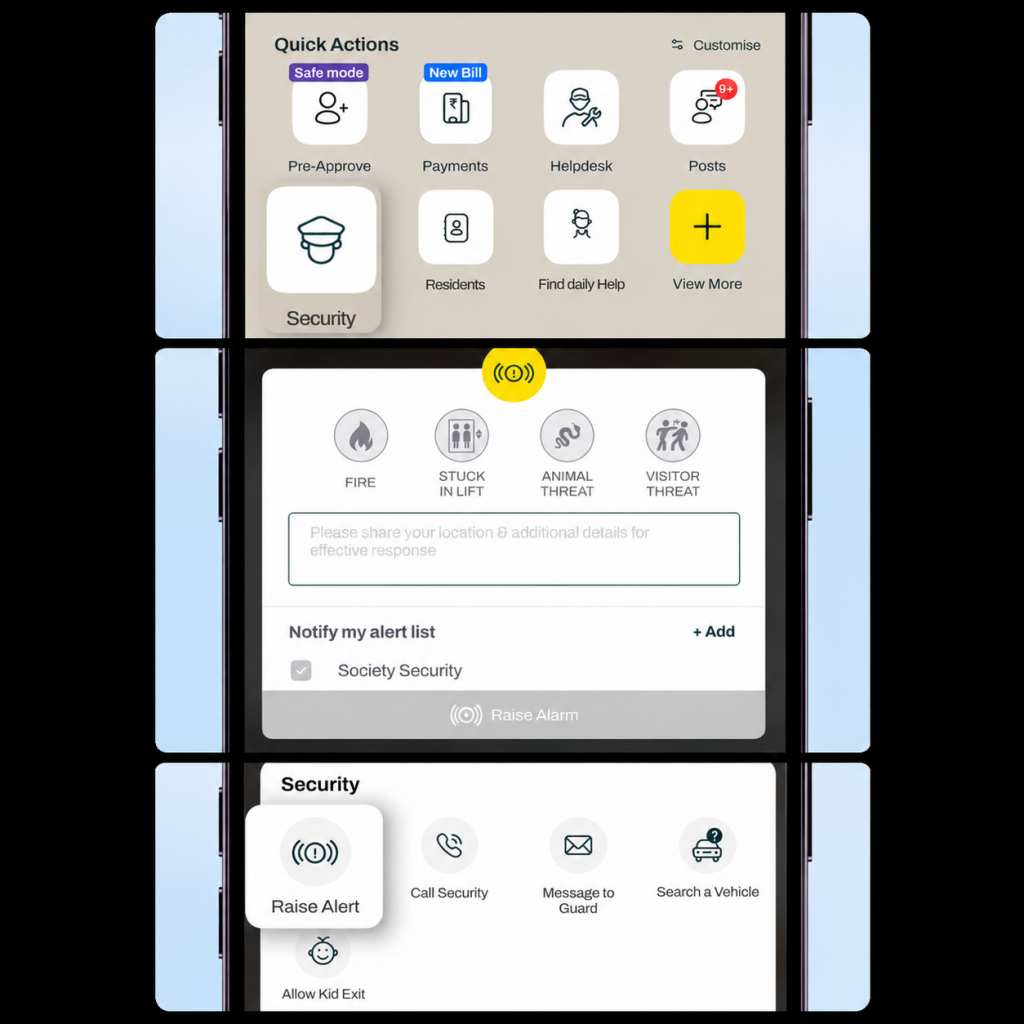
Once activated, your alert is immediately shared with your community’s security team, and your trusted contacts (if configured) are notified simultaneously so help can be coordinated without delay.
Conclusion
Emergencies can happen at any time, but getting help shouldn’t be complicated.
With Raise Alert, Mygate enables you to quickly connect with your society’s security team while keeping your trusted contacts informed, all from one place. It’s a simple feature designed to help you act faster, stay informed, and feel more secure when it matters most.
Because in an emergency, getting help quickly can make all the difference.
Wooden doors are the most common main entrance type in Indian homes, whether that is an independent house, a villa, or an apartment. This raises a genuinely practical question for anyone considering a smart lock. Does the existing door need to be replaced, or can a smart lock be fitted onto the wooden door already in place.
The short answer is that most smart locks can be installed on existing wooden doors without replacing them, provided the door meets a few basic requirements around thickness, material, and the condition of the existing hardware cutout. This guide covers what actually determines compatibility, how the installation process typically works, and the specific issues that come up with wooden doors that do not apply the same way to metal or glass doors.
What actually determines compatibility?
A smart lock is not a universal fit for every wooden door, but the requirements are narrower and more specific than most people assume. Compatibility generally comes down to three factors.
Door thickness matters because the lock’s internal mechanism, whether it is a mortise unit or a cylindrical body, needs to physically fit within the door. Most smart locks are designed for a standard thickness range, commonly somewhere between 35 and 50 millimetres, which covers the vast majority of residential wooden doors in India. Doors outside this range, either unusually thin or unusually thick, may need a specific model variant or additional fitting adjustments.
Door core construction matters more for wooden doors specifically than for other materials. A solid wood or solid core door provides a stable, dense surface for mounting the lock body and its internal components securely. A hollow core door, common in some lower cost or older constructions, can be more difficult to fit a smart lock into properly, since the lock mechanism needs enough solid material to anchor into rather than open space inside the door panel.
Existing hardware cutout refers to whatever lock or hardware is currently installed. If the door already has a standard mortise lock cutout, many smart locks can use the existing cutout with only minor adjustment, which significantly simplifies installation. If the door has a very old or non standard cutout, some carpentry work may be needed to adapt it, though this is usually a straightforward adjustment rather than requiring a new door altogether.
Mortise vs rim vs cylindrical locks on wooden doors
Different smart lock designs interact with wooden doors in different ways, and understanding this helps set the right expectation before installation.
Mortise style smart locks fit into a cavity cut directly into the edge of the door, similar to how many traditional deadbolts are installed. This is the most common configuration for wooden main doors in India, since most existing wooden doors already have a mortise cutout from a previous lock, making replacement relatively straightforward.
Rim locks mount on the surface of the door rather than being recessed into it. These can be a useful option for wooden doors where the existing cutout does not match a mortise unit’s requirements, since a rim lock avoids needing to modify the door’s internal cavity at all.
Cylindrical locks, which use a round bore rather than a mortise pocket, are less common as a starting point for retrofits but are sometimes used when a wooden door already has a compatible cylindrical bore from a previous lock installation.
For most wooden main doors already using a standard mortise lock, sticking with a mortise style smart lock tends to be the simplest path, since it works with the existing door preparation rather than requiring new cuts.
Do you need to replace the door, or just retrofit the lock?
In the large majority of cases, replacing the entire door is not necessary. Retrofitting a smart lock onto an existing, structurally sound wooden door is the standard approach, and most installation processes are specifically built around this rather than assuming a new door.
Replacement becomes a more realistic consideration only in specific situations, such as a door that has significantly warped or swollen over time and no longer closes flush within its frame, a hollow core door where there simply is not enough solid material to properly anchor a lock mechanism, or a door frame that has deteriorated to the point where any lock, smart or traditional, would not sit securely regardless of installation quality.
If the existing door and frame are in reasonable structural condition, which covers most wooden doors in regular use, a smart lock can generally be fitted directly onto it without needing carpentry beyond minor adjustments to the existing cutout.
Common issues specific to wooden doors
A few problems come up with wooden doors that do not apply the same way to metal or glass entrances, and it is worth knowing about these before installation rather than discovering them afterward.
Warping from humidity. Wood naturally expands and contracts with humidity and temperature changes, which is particularly relevant during monsoon season in much of India. A door that has warped slightly may no longer close as precisely as it did originally, which can affect how well a smart lock’s bolt aligns with the strike plate on the frame. This is worth checking before installation, since a door that does not close flush will cause alignment issues with any lock, not just a smart one.
Older doors with worn frames. Doors that have been in place for many years sometimes have frames that have shifted slightly or hardware cutouts that have worn beyond their original dimensions. This does not usually prevent installation, but it may require additional fitting adjustment during the process rather than a straightforward swap.
Painted or varnished surfaces. Reinstalling hardware on a door with thick paint or varnish buildup around the original cutout sometimes requires minor surface preparation to ensure the new lock sits flush and functions smoothly, particularly for the bolt mechanism.
Weight and swing. Solid wooden doors are generally heavier than hollow core alternatives, which is actually beneficial for smart lock installation, since the added weight and density gives the lock more stable material to mount securely.
None of these issues typically prevent installation altogether, but they are the kind of details that make working with an experienced installer valuable, since these adjustments are routine for someone familiar with wooden door retrofits but can be frustrating to handle without prior experience.
The typical installation process
While the exact steps vary slightly between lock models, installing a smart lock on an existing wooden door generally follows a consistent sequence.
The installer first measures the door thickness and checks the existing hardware cutout against the specific lock model’s requirements. If the existing cutout is compatible, the old lock is removed and the new smart lock body is fitted into the same opening, with only minor adjustment typically needed. If the cutout does not match, some careful adaptation of the opening is done to accommodate the new unit, still generally without requiring a full door replacement.
Once physically fitted, the lock’s electronic components are connected and tested, including registering fingerprints, setting a PIN, and confirming the mechanical key backup functions correctly alongside the electronic access methods. Alignment with the door frame’s strike plate is checked and adjusted as needed to ensure smooth, consistent locking and unlocking, which is particularly important for wooden doors that may have minor natural warping.
This entire process, for a straightforward retrofit onto a compatible existing wooden door, is generally completed within a few hours by an experienced installer, rather than requiring an extended renovation timeline.
Why does professional installation matter more for wooden doors?
While some smart lock installations are simple enough for a confident DIY attempt, wooden doors specifically benefit from professional installation more than other materials, given the variability in door age, condition, and existing hardware discussed above.
An experienced installer can quickly assess whether a door’s existing cutout is compatible, identify early signs of warping or frame issues that could affect alignment, and make the small adjustments that come up often in older wooden doors without damaging the door in the process. This is one of the areas where installation quality has a real, lasting impact on how well the lock performs day to day, since a smart lock that is slightly misaligned due to a rushed installation is a common source of frustration and premature wear, particularly on wooden doors where minor movement over time is more likely than with a rigid metal frame.
Mygate, for example, builds professional installation support into its smart lock offering specifically to handle this kind of variability, since Indian homes commonly have wooden doors of varying age and condition rather than a single standardised type. Its locks are also designed to be fitted without requiring major structural changes to the door, which matters directly for wooden doors where owners are often specifically trying to avoid the cost and disruption of door replacement just to add a smart lock.
When you might genuinely need a new door instead?
There are a small number of situations where retrofitting is not the right answer, and being upfront about this avoids setting the wrong expectation.
If a wooden door has warped significantly enough that it no longer closes flush within its frame under any reasonable adjustment, a smart lock will inherit that same alignment problem regardless of installation quality. If a door is hollow core with genuinely insufficient solid material for secure mounting, forcing a lock into it risks a mechanism that is not properly anchored, which undermines the security benefit the lock is meant to provide in the first place. And if a door frame itself has deteriorated structurally, rather than just the door panel, the issue extends beyond what a lock installation alone can resolve.
In these specific cases, addressing the door or frame issue first, whether through repair or replacement, is a better use of the investment than fitting a smart lock onto a door that will continue to cause alignment or security issues regardless of the lock installed on it.
A quick compatibility checklist
Before assuming a wooden door is ready for a smart lock, it helps to check a few things. Measure the door’s actual thickness and compare it against the lock model’s supported range. Confirm the door is solid or solid core construction rather than hollow, particularly for older or budget doors where this is not always obvious from appearance alone. Check that the door closes flush within its frame without needing to be forced, which indicates the frame and door are still properly aligned. And review the existing hardware cutout, since a standard mortise cutout generally simplifies installation considerably compared to a non standard or heavily worn opening.
Going through this checklist, or having an installer assess it during a site visit, before finalising a purchase avoids the more frustrating scenario of buying a lock only to discover during installation that the specific door needs additional work first.
FAQs
Can a smart lock be installed on an existing wooden door without replacing it?
Yes, in most cases. As long as the door meets basic thickness and construction requirements, a smart lock can typically be retrofitted onto an existing wooden door using the current or a slightly adapted hardware cutout.
Does a hollow core wooden door work with a smart lock?
It can be more difficult, since the lock mechanism needs enough solid material to anchor into securely. Solid or solid core wooden doors are generally better suited for smart lock installation than hollow core doors.
What thickness of wooden door is needed for a smart lock?
Most smart locks are designed for a standard thickness range, commonly between roughly 35 and 50 millimetres, which covers the majority of residential wooden doors, though it is worth confirming the specific range for the model being considered.
Does an old or warped wooden door affect smart lock installation?
Yes. A door that no longer closes flush within its frame due to warping can cause alignment issues with any lock, and this is worth checking and addressing before installation regardless of which lock is chosen.
Is professional installation necessary for wooden doors specifically?
It is strongly recommended, since wooden doors vary more in age, condition, and existing hardware than other materials, and an experienced installer can identify and handle these variables without damaging the door.
When would a wooden door need to be replaced instead of retrofitted?
Replacement becomes necessary mainly when the door has warped beyond reasonable adjustment, is hollow core with insufficient solid material for secure mounting, or the door frame itself has structurally deteriorated.
Conclusion
Most existing wooden doors, provided they are solid construction and in reasonable structural condition, can accommodate a smart lock without needing to be replaced. The details that matter most are door thickness, whether the door is solid or hollow core, and the condition of the existing hardware cutout, all of which a professional installer can assess quickly before any work begins. For the smaller number of cases where a door genuinely cannot support a secure retrofit, addressing that underlying issue first is a better investment than fitting a lock onto a door that will not hold it properly regardless of which model is chosen.